

Best POS for a Takeaway
What a takeaway needs from a POS, from phone orders and collection times to kitchen printing, drivers and cards, with six systems compared in November 2026.
7 min read

On this page
Key takeaways
- A takeaway is judged on how fast a phone order becomes a kitchen ticket, so choose by printing, times and delivery before price.
- Square, Clover, Lightspeed, TouchBistro, Epos Now and DineHarbor all price differently: free tiers, per till plans, hardware bundles or flat packages.
- Delivery, online ordering and kitchen screens are included in some packages and sold as add ons in others, so total a full year.
- DineHarbor puts phone, collection, delivery and online orders in one list, but its till does not take card payments by itself: you use your own card terminal and record the payment.
In short: the best POS for a takeaway is the one that gets a phone, counter or online order onto a kitchen ticket in seconds, handles collection and delivery times, and takes cards without a second system. Square, Clover, Lightspeed, TouchBistro, Epos Now and DineHarbor all can, but they differ on what is included and what is an add on. Prices below were read on each vendor's own page on 1 November 2026. We sell DineHarbor, so we show its limits as well.
What a takeaway needs
A takeaway is not a small restaurant. There are no tables to plan, but the rush is harder: the phone rings while the door opens and three delivery orders land at once. Check any system against this list.
- Phone orders: take a name and number, find the repeat customer, add the address, and finish before the next call. A slow till means a missed call.
- Collection and delivery times: a promised time on every order, not a guess shouted across the kitchen.
- Kitchen printing and auto print: the ticket should print when the order is accepted, with no one touching it. This matters most for online orders.
- Drivers: delivery zones with fees, a minimum order, a way to give a run to a driver and see where it is.
- Card terminals: a card taken at the counter or at the door should be recorded against the order, not keyed in twice.
- Online ordering in the same system: orders from your own website should land in the same list as the phone and the counter, with the same menu and prices.
Everything else, such as loyalty, reports and stock, is a bonus. If one of the six above is weak, you will feel it every Friday.
The options by feature
Prices are as of 1 November 2026, from each vendor's own page. VAT treatment is not stated on every page, so ask before you compare.
| System | What the vendor publishes | Takeaway features it names |
|---|---|---|
| Square for Restaurants | Free plan; Plus £69 a month per location plus processing (Square UK) | Kitchen tickets print automatically for takeaway; own website ordering with no monthly fee or commission; delivery and click and collect; Stuart courier integration; delivery app orders can go to the POS |
| Clover | Register £39.95, Table Service £59.95 a month; hardware and card rates not on the page (Clover plans) | Register adds order management and kitchen printers |
| Lightspeed Restaurant | Basic €89, Core €159, Pro €249 a month; extra register €49 (Lightspeed) | Click and collect, delivery and delivery app integrations are add ons on Basic and Core and listed as included on Pro, possibly with extra fees |
| TouchBistro | POS from $69 a month, Essentials Bundle from $119 (TouchBistro) | Online ordering and the kitchen display are separate add ons; no commission on online orders; delivery not mentioned on the page |
| Epos Now | Complete Solution bundle from £149 to £299 depending on the banner, with a 12 month subscription from £25 a month (Epos Now) | Names a kitchen display, online ordering and a delivery product; the page gives no details or prices for them |
| DineHarbor | Restaurant $50, Full service $90 a month per location, excluding tax (pricing) | Collection and delivery on the till, receipt and kitchen printing, own online ordering, delivery zones, own driver app |
A few notes on reading it. Square's page does not state the in person card rate, and Clover's does not state hardware or card rates, so a quote is part of the price. Lightspeed's own page shows €89 in the table and "from £79" in its FAQ, so confirm the figure and currency with them. Epos Now advertises several different bundle prices on one page, so ask for the written one.
Phone orders and collection times
The first test is the call. In most systems you can start an order for collection or delivery from the main screen, attach a customer, and send it to the kitchen. What differs is how quickly a repeat customer comes up and whether the time you promise is stored on the order.
Ask each vendor to do a phone order live: customer found by phone number, two pizzas or a curry with options, delivery address, a time, and a printed ticket. If any step needs a second screen, staff will skip it at the rush.
Kitchen printing and auto print
Paper still wins in most takeaway kitchens. Look for two things: whether the ticket prints by itself when an order is accepted, and whether it prints the full detail the cook needs, such as removed ingredients and notes. Square says its kitchen tickets print automatically for takeaway. Clover lists kitchen printers from its Register plan. Check what printers each one supports before you buy, because some vendors only work with their own models. Our printer set up guide lists what to ask.
Drivers and delivery zones
If you deliver with your own staff, the system should know where you deliver and what it costs. Look for fees by distance or drive time, a minimum order, free delivery above a basket value and an address check at checkout, so you never accept an order you cannot reach. Then a way to assign each run and to see it. Square lists a courier integration; Lightspeed sells delivery as an add on below Pro. Our guides on running your own delivery and takeaway and delivery profit show how to work out if a run pays.
Card terminals
A card taken at the door must end up on the order. Square, Clover and Epos Now sell their own readers, which ties payments to them. DineHarbor does the opposite: you take cards on your own terminal or provider and record the payment on the till, or online through Stripe checkout, and it adds no fee of its own.
DineHarbor for a takeaway
This is what the code does today, so you can judge it fairly.
- The till starts dine in, collection or delivery orders from one screen, with a customer picker that searches by name, phone or email. Orders show in the kitchen, the Manager and reports beside website orders.
- Printing: receipts and kitchen tickets print from the till to a receipt printer over Bluetooth, Wi-Fi or USB. When an online order is accepted, it can print the kitchen ticket, the receipt, both or nothing, and you can add a second slip marked copy for the delivery bag.
- Delivery: zones by road distance or drive time, each with a fee, a minimum order and a free delivery threshold, checked at checkout. If no routing service can measure the distance, the address is refused rather than guessed. A dispatch board and a driver app with live tracking, and a place for your own drivers on each package.
- Online ordering on your own site, with no commission on orders.
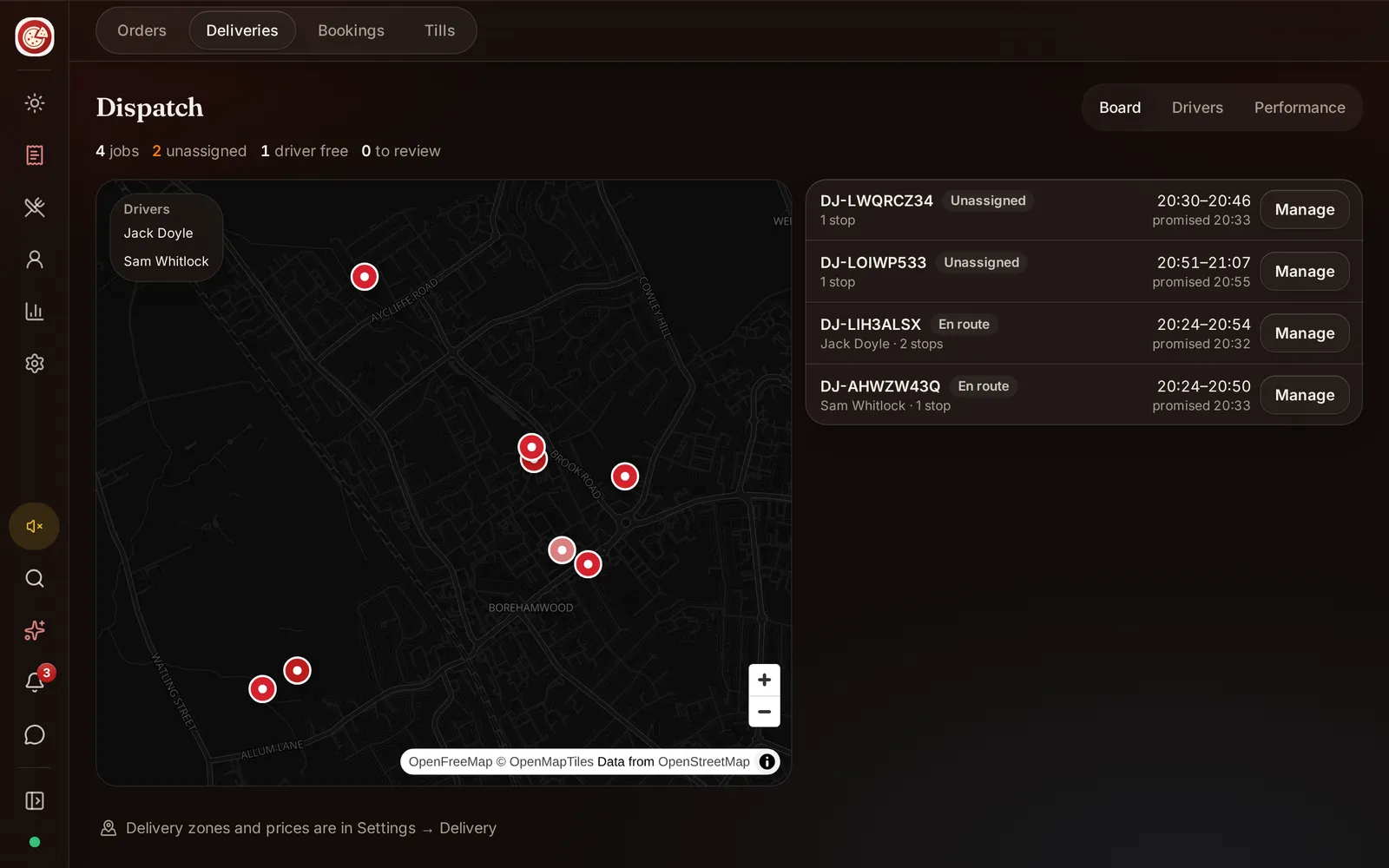
The limits are real. The till does not charge a card by itself: you take the card on your own terminal or provider and record it, or online through Stripe checkout. Payments on the till need a connection. DineHarbor does not take orders from Deliveroo, Just Eat or Uber Eats, and it does not sell hardware. A one person counter with a handful of orders a day may be cheaper on a free plan elsewhere. Smokey Woods, a pizzeria and takeaway, runs on DineHarbor: see smokeywoods.co.uk.
How to choose
- Write down your busiest hour: phone calls, counter orders and deliveries.
- Ask each vendor for a written total for a year: software, printers, card terminals, online ordering and delivery.
- Do a live phone order and an online order with auto print.
- Check what happens if the internet drops.
For the wider field, see the best restaurant POS systems, the POS cost guide and the pizzeria version of this guide. The DineHarbor POS and the pricing page have the current figures, and the takeaway solution shows a typical setup.
Questions and answers
What is the best POS for a takeaway?
The one that turns a phone, counter or online order into a clear kitchen ticket in seconds, handles collection and delivery times, and takes card payments without a second system. Total the cost for a year including printers, card fees and delivery before choosing.
Do I need a kitchen printer or a kitchen screen?
Most takeaways start with a printer because it works in a hot, greasy kitchen and staff already trust paper. Add a screen when tickets stack up or you want timers. Check whether the screen is included in the plan or priced separately.
Can a takeaway POS take phone orders properly?
It should let you pick or add a customer by name or phone number, choose collection or delivery, set a time and print straight to the kitchen. Ask each vendor to show a phone order from start to ticket.
Can I take orders from my own website without commission?
Yes. Square, TouchBistro and DineHarbor all say their own ordering has no commission on orders. Card processing fees still apply, and the delivery apps keep charging their own commission.
Do I need drivers in the system?
Only if you deliver with your own staff. Then you need delivery zones with fees, a way to assign a run and something the driver can open on a phone. If you only offer collection, you can skip this.
See it in DineHarbor
About the author
Editorial team
The DineHarbor team writes this blog for restaurant owners and managers. Every article is checked against the product before it is published, so what we describe is what the software does.
All articles by DineHarbor team

