

Best POS for a Pizzeria
What a pizzeria needs from a POS, from half and half and topping pricing to deals, delivery zones and drivers, with six systems compared in November 2026.
6 min read

On this page
Key takeaways
- A pizza menu breaks simple tills: sizes, toppings, half and half and deals must price the same on the till, the phone and the website.
- Ask every vendor to ring up a half and half pizza with an extra topping and a deal before you look at the price.
- Delivery decides the margin, so check zones, fees, a minimum order and a driver view as closely as the menu.
- DineHarbor prices half and half three ways and uses one pricing module on till and website, but it does not take delivery app orders.
In short: the best POS for a pizzeria is the one that prices your hardest pizza correctly, every time, on the till, the phone and the website, and then handles delivery. Check half and half, size and topping pricing and deals first, then delivery zones and drivers. Prices below were read on each vendor's own page on 1 November 2026. We sell DineHarbor, so we also say where it falls short.
What a pizzeria needs
A pizza shop is a delivery business with a hard menu. These are the things that separate a pizza POS from a general one.
- Size and topping pricing: a base price per size, some toppings included, extra toppings charged, and the charge changing with the size.
- Half and half: two toppings or two pizzas on one base, priced by a rule you choose.
- Removals and swaps: no onions, swap peppers for mushrooms, and the ticket must say so clearly.
- Deals: two pizzas and a side for a set price, a lunch deal, a meal with a drink slot.
- Delivery zones and fees: the area, the fee, the minimum order.
- Drivers: who has which run, and where they are.
- One order list: phone, counter and website in the same queue for the oven.
Our pizzeria business guide covers costs and margins. This post covers the software.
The options at a glance
Prices as of 1 November 2026, from each vendor's own page. Vendors do not publish pizza specific details such as half and half on their pricing pages, so treat that column as a question to ask, not a claim.
| System | What the vendor publishes | Pizza and delivery points to check |
|---|---|---|
| Square for Restaurants | Free plan; Plus £69 a month per location plus processing (Square UK) | Own website ordering with no monthly fee or commission; delivery, click and collect and a Stuart courier integration; ask how it prices half and half |
| Clover | Register £39.95, Table Service £59.95 a month (Clover plans) | Register lists order management and kitchen printers; hardware and card rates by quote |
| Lightspeed Restaurant | Basic €89, Core €159, Pro €249 a month; extra register €49 (Lightspeed) | Delivery and click and collect are add ons on Basic and Core, listed as included on Pro |
| TouchBistro | POS from $69 a month, Essentials Bundle from $119 (TouchBistro) | Online ordering and kitchen display are add ons; delivery not on the page |
| Epos Now | Bundles from £149 to £299 on a 12 month subscription from £25 a month (Epos Now) | Names a delivery product and a kitchen display, with no details on the page |
| DineHarbor | Restaurant $50, Full service $90 a month per location, excluding tax (pricing) | Half and half rules, deals, delivery zones, driver app; see below |
Square's page does not state the card rate, Clover's does not state hardware or card rates, and Lightspeed shows €89 in its table but "from £79" in its FAQ. Ask each for a written quote for your setup.
Half and half, sizes and toppings
This is where general tills fail. Ask each vendor to ring up a large half and half pizza with one extra topping on one side, one ingredient removed and a deal applied. Then ask what the website shows for the same pizza. If the two differ, you will either lose money or argue with customers.
The three common rules for half and half are:
- Dearer half: the pizza costs as much as the more expensive side.
- Average: the two sides are averaged.
- Sum: each half is priced and added up.
None of these is wrong. The point is that the system lets you choose and applies it everywhere. Also ask whether an extra topping on one half costs the full or half charge, and whether swaps are free. These look small, but across a Friday night they add up.
Delivery zones and drivers
Delivery usually decides the margin on a pizza, so give it the same attention as the menu. Look for fees by distance or drive time, a minimum order, free delivery above a basket value, and an address check at checkout. Then a driver view: who has which run and when it is promised. Our guides on running your own delivery and takeaway and delivery profit show how to work out whether a run pays, and stopping delivery app commission covers moving orders to your own site.
DineHarbor for a pizzeria
Here is what the product does today, taken from the code.
- Pizza rules: each pizza can have a rule for which options are included toppings and which are paid extras, how many toppings the base price covers, and whether half and half is on. Half and half can price at the dearer half, the average or the sum, and an extra topping can charge in full or half. Free swaps can be off, equal value, any, or same type, such as vegetable for vegetable.
- The till: choose size, extras and removals, and for a pizza choose Whole or Two halves, then pick toppings for the left and right half. The ticket shows left half and right half.
- Same price everywhere: the till uses the same pricing module as the online storefront, checked against shared test baskets, so a basket costs the same on both.
- Deals: bundles with fixed prices and choice groups, such as a pizza plus a side plus a drink slot.
- Delivery: zones by road distance or drive time with a fee, minimum order and free delivery threshold, a dispatch board, and a driver app with live tracking. Each package includes places for your own drivers: two on Restaurant, three on Full service, according to the pricing page.
- Printing: kitchen tickets and receipts print from the till, and an online order can print on acceptance.
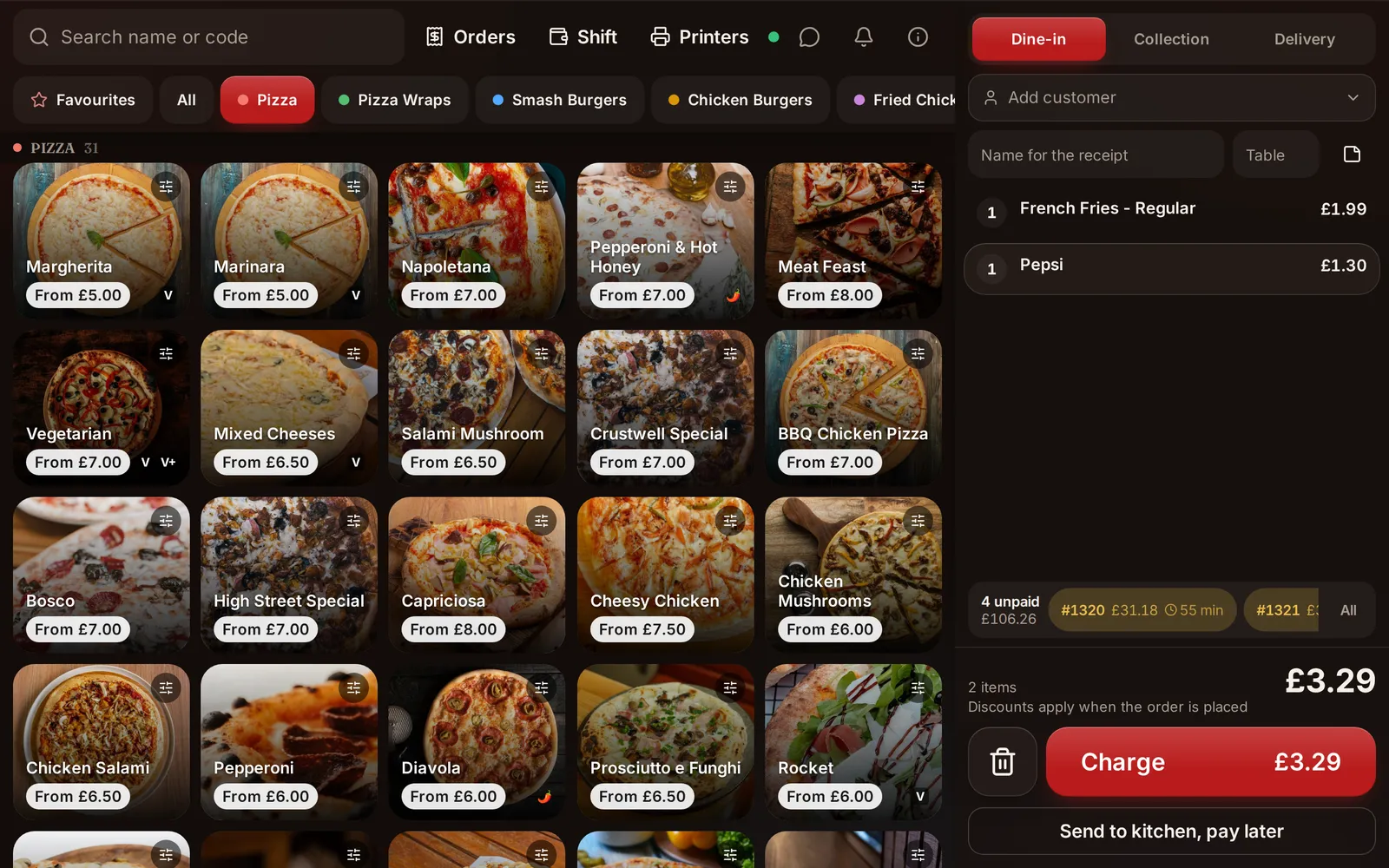
Smokey Woods is a pizzeria and takeaway that runs on DineHarbor: see smokeywoods.co.uk. You can also try the made up pizza and grill restaurant in the live demo.
The limits matter. The till does not charge a card by itself: you take the card on your own card terminal or provider and record it, or online through Stripe checkout. DineHarbor does not take orders from Deliveroo, Just Eat or Uber Eats, and it does not sell hardware. Payments on the till need a connection. If most of your orders come through those apps, a system that receives them, such as Square, may suit you better.
How to choose
- Pick your hardest pizza and ring it up on each system's demo.
- Compare the till price with the website price for the same pizza.
- Ask for a written yearly total with printers, card terminals, online ordering and delivery.
- Look at the oven ticket: is it clear, and does it print on its own?
See also best POS for a takeaway, the best restaurant POS systems and what a POS costs. The DineHarbor POS, the pizza solution and the pricing page have the details.
Questions and answers
What is the best POS for a pizzeria?
One that prices sizes, toppings, half and half and deals correctly, prints a clear ticket to the oven, and handles delivery zones and drivers. Test it with your own hardest pizza before you compare monthly prices.
How should half and half pizzas be priced?
There is no single rule. Many shops charge the dearer half, some average the two, some add them. Your POS should let you choose the rule rather than force one, and the website should use the same rule.
Do I need delivery zones?
If you deliver, yes. Fees by distance or drive time, a minimum order and a check on the address at checkout stop you accepting orders that lose money or that you cannot reach.
Can the same system take phone, counter and website orders?
It should. Friday night orders arrive from three places and the kitchen needs one list in order. Ask each vendor to show all three on one screen.
Is a free POS enough for a pizzeria?
A free plan can run a simple counter. Pizza usually needs modifiers, deals, delivery and kitchen printing, which are paid or add ons in most systems. See our guide to free POS options for what free really covers.
See it in DineHarbor
About the author
Editorial team
The DineHarbor team writes this blog for restaurant owners and managers. Every article is checked against the product before it is published, so what we describe is what the software does.
All articles by DineHarbor team

