

AI in Restaurants: What Works and What Does Not
A plain guide to AI in restaurants: voice ordering, menu import, guest assistants, forecasting, drafting text and manager questions, with limits and privacy.
Updated 8 min read
On this page
Key takeaways
- AI is most useful on narrow, checkable jobs: taking a clear order, reading a menu photo, answering questions about your own data and drafting text.
- It can be wrong, so keep a human check on anything that touches allergens, prices, money or a guest's data.
- The UK ICO's AI guidance is organised around the data protection principles, including transparency, accuracy and fairness, so tell people when AI is involved and keep the data you use to a minimum.
- Test any AI feature on a small, real task, compare it with your current way, and measure time saved and mistakes.
In short: AI is a tool for narrow, checkable jobs. It can speed up menu entry, take simple orders, answer questions about your own data and draft text. It makes mistakes, so check anything involving allergens, prices or money, tell guests when they are talking to AI, collect as little personal data as you can, and judge each feature by what it saves you in practice.
About 8 minutes to read. General information. Features, laws and tools change quickly: check current details.
Every restaurant owner now hears about AI: from software vendors, from friends and from headlines. Some of it is hype. Some of it is genuinely useful. The trick is to know which jobs suit it and which do not, and to test before you rely on it.
What AI is good at, and what it is not
Today's AI tools are good at pattern jobs with language, images and numbers: turning speech into text, reading a photo, summarising, answering questions from a set of facts, drafting words. They are weaker at jobs where a single wrong answer is costly, where the facts are not in front of them or where judgement about people matters.
A useful rule: let AI draft, and let a person decide.
Seven uses in restaurants
1. Voice ordering
An AI voice agent can take a simple order by phone, on a kiosk or at a drive-through lane and send it to the kitchen. It works best when the menu is clear, the order is simple and there is an easy hand off to a person. DineHarbor includes AI voice ordering on the website and kiosk and at a drive-through lane. See AI voice ordering for restaurants and self order kiosks.
Watch for: accents and noise, long modifiers, allergy questions and callers who just want a human.
2. Reading a paper menu into a digital one
Turning a printed menu into an online one means typing every item, price and description. An AI tool can read a photo and make a draft, which you then correct. DineHarbor's menu import reads a photo of your menu so you start from a draft instead of a blank page. See paper menu to online menu.
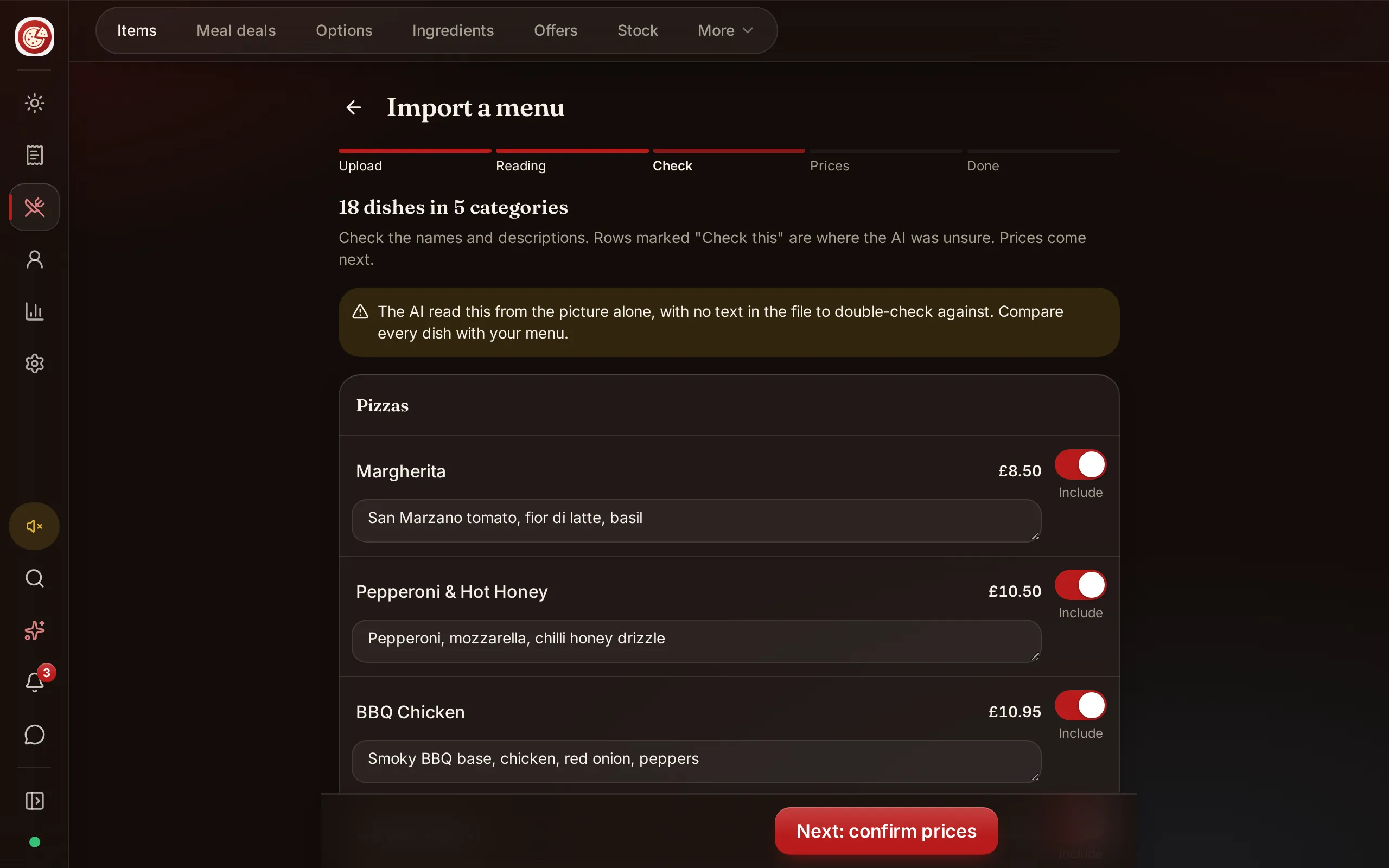
Watch for: misread prices, missing items and descriptions that sound plausible but are wrong. Check every price and every allergen yourself.
3. Answering guests' questions about the menu
A menu assistant can answer "what is vegetarian?" or "what is gluten free?" from your own data. DineHarbor has an AI assistant for diners, "Ask the menu". An assistant like this is only as good as the data it reads: if your allergen information is out of date, its answers will be too. Treat it as a convenience that points to your written information, not as the source of truth. See allergen training and allergens and calories.
4. Asking questions about your own numbers
A manager assistant can answer plain questions such as "how were sales last Saturday compared with the week before?" so you do not have to hunt through reports. DineHarbor's Manager copilot answers supported questions about your own numbers in plain words. See AI assistants for restaurant owners and weekly numbers.
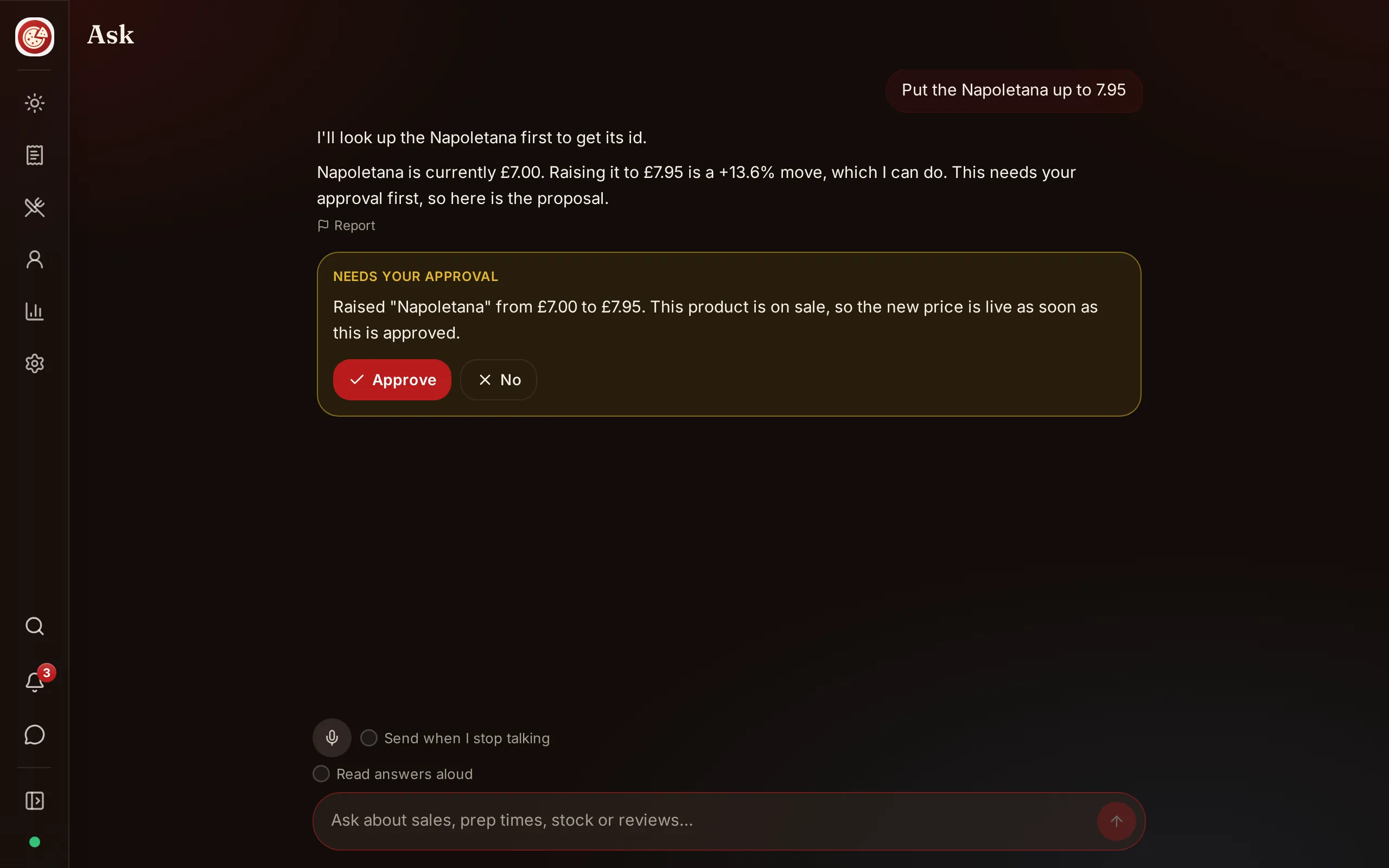
Watch for: confirm the answer against the report when a decision depends on it.
5. Forecasting and planning
Software can look at past sales, bookings, weather and events to suggest how many covers to expect, how much to prep and how many staff to schedule. Forecasts are useful for ordering and rotas, but they are guesses. Compare them with what really happened and adjust. See labour cost and the rota and stock control.
6. Drafting words and ideas
AI can draft menu descriptions, social posts, replies to reviews and emails. It often sounds generic and sometimes invents details. Use it for a first draft, rewrite in your own voice and check every fact. Never use it to write fake reviews, and never publish a reply to a complaint without reading it. See menu design and descriptions, reviews and complaints and restaurant social media.
7. Translation
AI can translate a menu quickly. Have a speaker of each language check the result, especially dish names, allergen words and religious or dietary terms. See halal and kosher menus.
Limits and risks
- Wrong answers. AI can sound confident while being wrong. Put a human check on prices, allergens, quantities and promises.
- Allergens. Treat AI as an assistant that reads your written data. Never let it be the only source. If a guest has an allergy, a person should confirm.
- Bias and fairness. Systems can treat people differently without anyone intending it. The UK ICO's guidance on AI and data protection includes a chapter on fairness, covering algorithmic fairness, bias and discrimination, and automated decisions. Do not use AI alone to make decisions about staff, such as hiring or discipline.
- Overreliance. If the system fails, can you still serve? Keep a manual fallback: a paper menu, a phone and a trained person.
- Cost. Some AI features are priced by use. Check the real cost against what the task costs you now.
- Guest trust. Some guests do not want to talk to a machine. Offer a human option.
Privacy and data
AI features often handle personal data: names, phone numbers, voice recordings, order histories. The ICO's guidance on AI and data protection, last updated in March 2023 and under review because of the Data (Use and Access) Act, is organised around the data protection principles. It includes a transparency chapter, new sections on lawfulness and on inferences, statistical accuracy under the accuracy principle and a fairness chapter, and it adds considerations for data protection impact assessments. The ICO's principles also include data minimisation (holding data limited to what is necessary for your purpose) and storage limitation (keeping identifiable data no longer than necessary).
In practice:
- Tell people. If a voice agent answers, say so at the start. If an assistant answers questions, label it.
- Collect the minimum. Do not store more than you need.
- Know where data goes. Ask your software supplier what is stored, where, for how long and who can see it.
- Keep recordings only as long as you need them, and tell callers if calls are recorded.
- Do not paste secrets or guest data into public tools.
- Offer a way to reach a person.
- Check local rules. These differ by country and change. Ask your data protection authority.
How to test an AI feature
Run a small experiment before you commit.
- Pick one job and write down how you do it now and how long it takes.
- Run the AI version alongside for two weeks, with a person checking.
- Count: time saved, mistakes found, guest reactions, cost.
- Ask the team: do they trust it, does it get in the way?
- Decide: keep, change or stop. Write down why.
- Review again after a month, because tools and menus change.
Questions to ask a vendor
- What exactly does the AI do, and what does a person still do?
- How accurate is it on menus like mine, and how can I see its mistakes?
- Can guests reach a person at any time?
- What data do you store, for how long, and where?
- Is there a recording, and how do I tell guests?
- What happens if the AI service is down?
- How is it priced, and what does a busy month cost?
- Can I turn it off?
Common mistakes
- Trusting AI answers on allergens without checking.
- Buying a tool because of the label "AI", not because of a problem.
- Hiding that a guest is talking to AI.
- Storing recordings and details indefinitely.
- Publishing AI generated text unchecked.
- No fallback when the system fails.
- Measuring nothing.
A checklist
- Choose one narrow job to improve.
- Let AI draft and a person decide.
- Keep allergen and price checks human.
- Tell guests when AI is involved and offer a person.
- Collect the minimum data and delete it on time.
- Test for two weeks and count time saved and mistakes.
- Ask vendors the questions above.
- Keep a manual fallback.
Sources
- ICO, Guidance on AI and data protection, updated 15 March 2023 and under review, read in October 2026.
- ICO, A guide to the data protection principles, read in October 2026.
- Your national data protection authority for the rules where you operate.
Want to see how AI features work in a restaurant system? Start the 30 day free trial with no card needed.
Questions and answers
What can AI do for a restaurant today?
Common uses include taking simple phone or kiosk orders by voice, reading a photo of a paper menu into a draft digital menu, answering guests' questions about the menu, answering the owner's questions about their own numbers, forecasting demand and drafting text for menus and posts. Each needs a human check.
Is AI safe for allergen questions?
Only as an assistant that reads your written allergen data, never as the source of truth. Check the data yourself, show where an answer comes from and give guests an easy way to speak to a person.
Will AI replace staff?
It can take over repetitive tasks such as answering the same question or typing a menu. Hospitality still depends on people for service, cooking and judgement.
What are the privacy risks?
AI features may handle names, phone numbers, voice recordings and order histories. Collect the minimum, say how data is used, keep it secure and delete it when you no longer need it. Rules differ by country.
How do I test an AI feature?
Pick one task, run it alongside your current method for two weeks, count mistakes and time saved, and ask staff and guests what they think. Keep it only if it clearly helps.
See it in DineHarbor
About the author
Editorial team
The DineHarbor team writes this blog for restaurant owners and managers. Every article is checked against the product before it is published, so what we describe is what the software does.
All articles by DineHarbor team