

AI Assistants for Restaurant Owners
Ask restaurant sales and menu questions in plain words, understand what a Manager copilot can answer, and keep approval and verified data around every action.
7 min read
On this page
In short: a restaurant assistant can turn a plain question into a supported report answer, but it is only as reliable as the authorised data and tool behind it. Ask specific questions, check the dates and branch, and require approval before any change. Use it to shorten analysis, not remove judgement.
DineHarbor offers a Manager copilot for owners and Ask the menu for diners. Its product principle is that AI asks before it acts.
Two assistants with different jobs
The Manager copilot works with authorised restaurant information. An owner can ask supported questions about sales and operations in plain language. The answer comes from controlled insight queries rather than giving a general model unrestricted database access.
Ask the menu is customer facing. A diner can ask about the actual menu. The value depends on accurate product, option and allergen records. It should not invent a dish or turn incomplete allergen data into a safety promise.
Keep the two roles separate. A guest does not need internal sales information, and a manager question should not be answered from public marketing copy.
The DineHarbor AI overview describes current capabilities and controls. Watch the AI assist guide before enabling or judging the workflow.
Ask specific report questions
A broad question such as how are we doing can hide the date, branch and measure. A useful question names them: how did completed sales and order count at this branch change versus the previous comparable week?
Other practical questions include:
- Which products led by quantity in the last seven complete days?
- Which branch local hours had the most orders this month?
- How did preparation time change versus the previous period?
- Which products were frequently unavailable?
- What sales pattern supports a staffing review?
DineHarbor's insight code includes sales comparison, top products, preparation time and order volume by hour. The visible Reports screen uses the same query layer for core reports.
Always read the scope and notes. A comparison may exclude cancelled orders or use branch local time. A correct answer to the wrong period is still unhelpful.
Understand where the answer comes from
A controlled assistant should select a known tool, validate parameters and return structured data. It can then explain the result in plain words.
That reduces hallucination risk but does not eliminate bad interpretation. If an order status was not updated, a preparation report can reflect the workflow error. If the menu has duplicate items, a product result can be split.
Ask to see the underlying period and measure. Compare important decisions with the report screen or exported records. The assistant should make investigation faster, not make evidence invisible.
Use the weekly restaurant reports guide to choose the measures worth asking about.
Keep approval before action
Answering a question and changing the restaurant are different risk levels. A menu edit, price change or availability action affects guests and service.
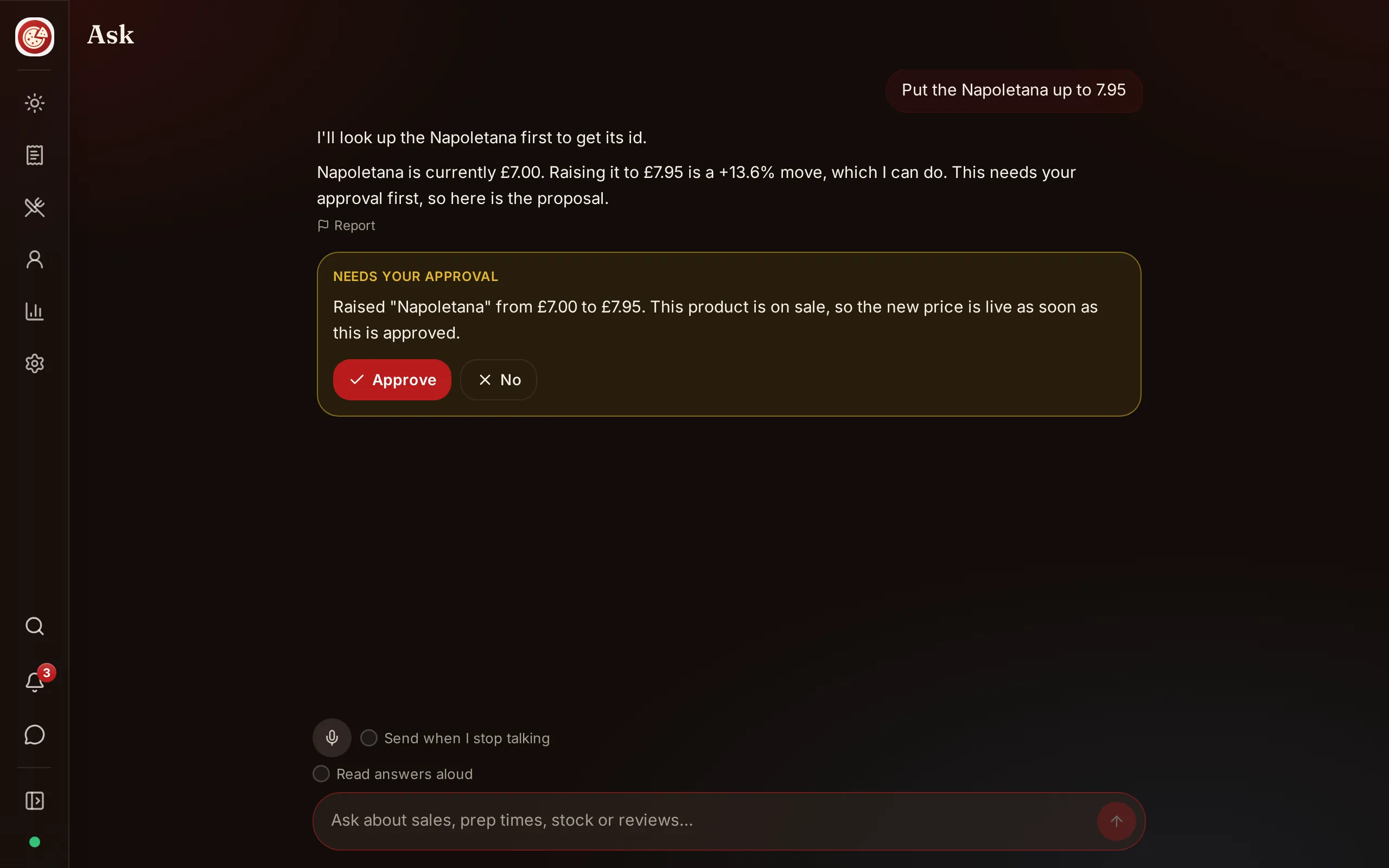
DineHarbor's AI design uses action proposals and confirmation. The assistant can prepare a supported action, while an authorised person reviews and confirms or cancels it. Permission checks and branch scope still apply.
Before confirming, read the exact products, values and branch. Check timing. A correct price change applied during service can still be operationally harmful.
Do not train staff to approve because the assistant sounds certain. Give particular roles authority for particular changes, and keep the audit record.
Use AI credits deliberately
AI tasks consume credits under DineHarbor's usage controls. The 30 day Growth trial includes 500 AI credits. Starter, Growth and Unlimited currently include different monthly allowances, shown on pricing.
Credits are an allowance, not a guarantee of a fixed number of conversations. Different tasks can require different usage. Check the billing screen and set internal expectations.
Use ordinary reports for recurring facts and the assistant where natural language or synthesis saves work. Asking the same basic total repeatedly may be less useful than bookmarking the report.
Never paste secrets, card details or unnecessary personal information into a question. Ask with branch, date and measure rather than naming individual guests unless a supported operational task truly requires it.
Help diners ask the menu
Ask the menu can help a guest find dishes, understand options and explore the current catalogue. It should only describe products that exist in the menu data.
Make the source records strong. Use plain product names, useful descriptions, verified allergens, accurate calories where shown and well structured options. Mark unavailable items promptly.
For allergy questions, the assistant must not replace trained staff or the restaurant's food safety process. The guest needs clear access to verified information and a human route. Read the allergen information guide.
Test diner questions in English, Arabic, Spanish and French where those menu translations are published. A translation needs fluent review; an assistant cannot rescue misleading source text.
Check privacy and permissions
Only authorised users should access internal restaurant answers. Branch scope must prevent one location from seeing another without permission.
DineHarbor's copilot controllers use authenticated branch context and permission checks. Consent and availability controls are part of the current implementation. The restaurant still needs appropriate policies and staff training.
Limit retained personal data and follow applicable privacy law. Review provider and product terms for how prompts and outputs are handled. This article does not claim a legal basis for a particular restaurant.
Remove access when staff leave, enforce two factor authentication for sensitive roles and review unusual assistant actions through the audit trail.
Run a useful pilot
Choose five questions whose answers a manager already knows from reports. Ask them with clear scope and compare results. Include one ambiguous question to see whether the assistant asks for clarification.
Then test one low risk proposed action in a safe context. Confirm that an unauthorised role cannot approve it, the owner sees exact details and cancellation changes nothing.
Record accuracy, time saved, unclear wording and corrections. Do not use a fabricated accuracy percentage. Repeat after menu or report changes.
Train managers to challenge an answer: what dates, which branch, which orders, and what definition? A confident paragraph without those basics should not drive a decision.
Keep human judgement
Reports do not know every local event, and assistants do not see everything that staff see. A school holiday, road closure, private booking or broken fryer can explain a pattern.
Bring the assistant's result to a short team conversation. Ask what changed on the floor and in the kitchen. Choose one measured action rather than accepting a long list of generic advice.
AI is most useful as a careful interface to known restaurant data. It should make a good manager faster while leaving responsibility visible.
Know when not to ask AI
Use the ordinary control for urgent operational actions when it is faster and clearer. A cook marking an item unavailable or a manager checking a payment should not turn into a long conversation merely because an assistant exists.
Do not ask the assistant for legal, tax, employment or food safety conclusions and treat the answer as professional advice. Use official guidance and qualified advisers. The assistant can help locate internal records, but the restaurant remains responsible for regulated decisions.
Finally, do not use it to judge individual workers from a single number. Review context, permissions and source records with people who understand the shift.
Ready to test plain language questions against your own reports? Start the 30 day free trial with no card needed.
Questions and answers
What can the DineHarbor Manager copilot answer?
It can answer supported questions about the authorised branch's sales and operations using controlled insight tools, such as sales, products and busy hours.
Can the assistant change the restaurant without approval?
DineHarbor's stated design is that AI asks before it acts. Review every proposed change and keep permissions around who may confirm it.
What is Ask the menu?
It is a diner assistant that helps guests ask questions about the restaurant's actual menu. Verified menu and allergen data still remain essential.
See it in DineHarbor
About the author
Editorial team
The DineHarbor team writes this blog for restaurant owners and managers. Every article is checked against the product before it is published, so what we describe is what the software does.
All articles by DineHarbor team