

Menu Design and Descriptions That Sell
Design a menu guests can read in two minutes: layout, categories, honest descriptions, prices, photos and allergen information for print and online menus.
Updated 6 min read
On this page
Key takeaways
- A good menu is easy to scan: clear categories, a manageable number of dishes and prices that do not shout.
- Descriptions should say what the dish is, how it is cooked and what makes it special in plain words, with no claims you cannot prove.
- Guide the eye to the dishes you want to sell, using placement and a few well chosen highlights, but never mislead.
- Check every word for accuracy: allergens, origin, vegetarian or halal claims and prices must match what is served.
In short: design the menu so that a hungry guest can find something they want in under two minutes. Use clear categories, a sensible number of dishes, honest, specific descriptions, quiet prices and accurate allergen information, then check how it performs and refine it.
About 8 minutes to read. General information as of October 2026. Allergen, price display and labelling rules differ by country; check your authority.
A menu is a sales tool, a promise and a legal document. It tells guests what you cook, what it costs and what is in it. A messy menu makes guests anxious; a clear one makes choosing easy and spend rises naturally.
Start with a list, not a layout
Before any design, build a master list:
- Every dish and drink with the exact name guests will see.
- The price.
- A short description.
- Allergens and dietary information, kept up to date. See allergens and calories.
- Which dishes you want to push, based on margin and popularity. See menu engineering and how to price a menu.
Then lay it out. This order keeps the design from deciding the content.
Keep it a manageable size
Too many options slow guests down, increase kitchen complexity and raise waste. Group dishes into a few categories and keep each one short enough to scan. If you cannot choose which dishes to cut, check sales and margin: dishes that sell little and earn little are the first to go.
Organise the categories
Use headings that match how guests think: starters, mains, sides, desserts, drinks. Put categories in the order guests eat, and consider these points:
- Keep the number of headings small.
- Use names guests understand, not clever terms they must decode.
- Group vegetarian, vegan and gluten free options in a way that is easy to find, but do not hide them in a separate corner that feels like an afterthought. See vegan and vegetarian menus.
- Add a short line for sharing plates, set menus or tasting menus if you offer them. See set menus and lunch deals.
Guide the eye, honestly
Guests do not read a menu line by line. They scan. You can help them see the dishes you are proud of.
- Place the dishes you most want to sell where the eye lands first in each section.
- Use a box, a small icon or a short "house favourite" note on a few dishes, not on everything.
- Avoid a column of prices lined up on the right, which invites price comparison; put the price after the description in the same line of text.
- Avoid decoy tricks that mislead. Do not claim a dish is a bestseller unless the sales data show it.
Use your own sales data to decide which dishes to feature. DineHarbor reports show top products so that you can base the choice on what actually sells.
Write descriptions that tell the truth
A good description is specific, short and honest.
- Name the main ingredients in order of importance.
- Say how it is cooked if that is part of the appeal: slow roasted, charred, hand rolled.
- Add one distinctive detail: a sauce, a spice, a local source you can prove.
- Use plain words that guests can say out loud.
- Avoid claims you cannot back up: "the best", "organic", "locally sourced" or "fresh" need to be true.
Compare:
| Weak | Better |
|---|---|
| Our delicious chicken dish | Roast chicken thigh with lemon, thyme and crisp potatoes |
| Amazing homemade soup of the day | Tomato and basil soup, served with toasted sourdough |
| Fresh seasonal salad | Beetroot, goat's cheese and walnut salad with honey dressing |
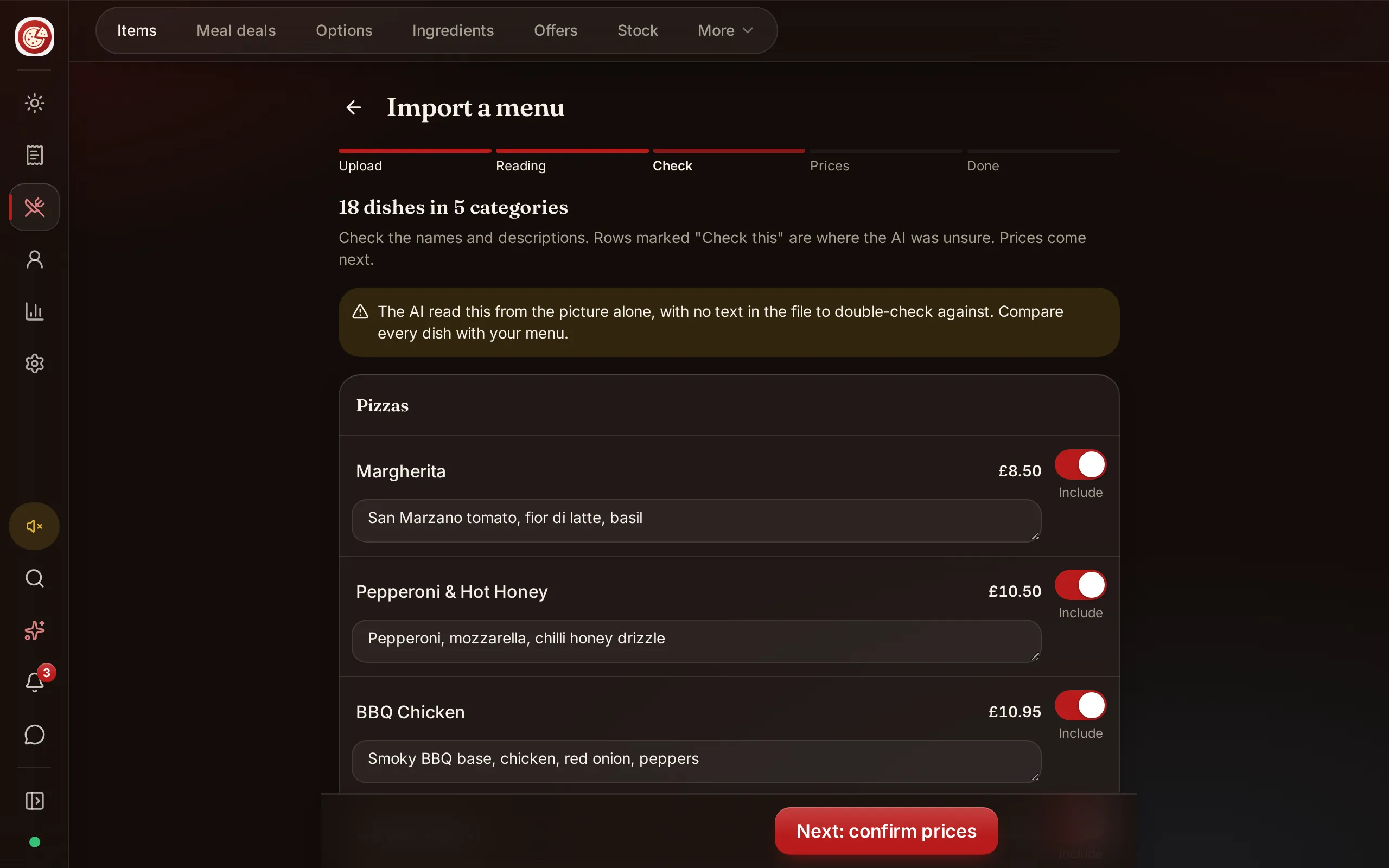
If you write many descriptions, DineHarbor's menu import can draft descriptions and suggest allergens from a photo or PDF of your menu, which you then read and correct. You remain responsible for every word. See paper menu to online menu.
Prices that feel calm
- Choose one price format and use it everywhere.
- Round prices to a simple structure you can explain.
- Make sure prices include any tax that the law requires you to show to consumers. See VAT and sales tax.
- Show extras, such as sides, sauces and supplements, clearly so the final bill holds no surprises.
- Do not show a price that differs between the paper menu, the website and the kiosk. Guests will remember.
Photos and images
Photos work on screens, kiosks and delivery pages, and they raise expectations. Use them when:
- They show the actual dish, in the portion served.
- The lighting is natural and the plate is clean.
- You can keep them up to date as the dish changes.
Use few photos on printed menus. A page of mediocre images makes a place look cheap. See restaurant social media for tips on photographs.
Typography and layout
- Use one or two typefaces.
- Make the text large enough to read in dim light and for older guests; test on a phone and in candlelight.
- Leave white space. Crowding makes guests feel rushed.
- Make sure the colours have enough contrast. Light text on a photo is a common mistake.
- Check accessibility. Provide large print or a digital version for guests who need it.
Allergens and dietary information
Allergen information must be accurate and available. In the UK, food businesses must be able to tell customers when a dish contains any of the 14 listed allergens. A short line on the menu telling guests to ask staff is common; the information behind it must be correct. See allergens and calories and the Food Standards Agency's allergen guidance. If you list calories in England, see calorie labelling.
Be careful with terms like vegan, vegetarian, halal and gluten free: they are claims, and you need to be able to stand behind them. See halal and kosher menus.
One master, many versions
You will have a printed menu, an online menu, a QR menu, a kiosk and maybe a delivery listing. Keep one master list, change it once and publish to all. DineHarbor's online ordering and menu translations work from one menu so that the website, QR ordering and kiosk stay in step, and menus can be shown in English, Arabic, Spanish and French.

Test and refine
- Watch guests read the menu. How long do they take, where do they stop, what do they ask?
- Check sales by dish for a month after any change.
- Ask staff which dishes guests ask about and which they struggle to describe.
- Update seasonally. See seasonal menu planning.
A checklist
- Master list built with names, prices, descriptions and allergens.
- Dishes trimmed to a manageable number.
- Categories clear and in eating order.
- Descriptions short, specific and true.
- Prices calm and consistent, with tax shown as the law requires.
- Photos only where honest and good.
- Readable type and contrast.
- One master for every version.
Putting your menu online? Start the 30 day free trial with no card needed.
Questions and answers
How many dishes should a menu have?
As few as your kitchen can make well and your guests need to choose easily. Many restaurants find that a focused menu with a handful of dishes per category speeds service and cuts waste. Test by watching how long guests take to order.
Should I put prices with currency signs?
Many menus show plain numbers without currency signs, because signs can make guests focus on cost. Either way, be clear and consistent, and make sure prices include any tax that the law requires you to show.
Do photos help?
Good, honest photos help online and on kiosks and screens. Bad ones hurt. On printed menus, use few and keep them accurate to the portion served.
How long should a dish description be?
Usually one or two lines: the main ingredients, the cooking method and one detail that makes it distinct. Long stories slow guests down.
How do I keep the online and paper menu the same?
Keep one master list of dishes, prices and allergen details and produce both from it. Change it once, then update every version.
See it in DineHarbor
About the author
Editorial team
The DineHarbor team writes this blog for restaurant owners and managers. Every article is checked against the product before it is published, so what we describe is what the software does.
All articles by DineHarbor team

