

Run Your Own Restaurant Delivery
Plan restaurant delivery with your own drivers, sensible zones, clear fees, a dispatch routine and live customer tracking without losing control at peak time.
Updated 6 min read
On this page
In short: your own drivers can give you more control over the guest experience and repeat customer relationship, but the restaurant takes responsibility for staffing, insurance, safety and dispatch. Start with a small service area, price the real cost, test the handover and expand only when delivery times remain dependable.
DineHarbor provides delivery zones and dispatch, a driver app and live tracking. The driver app and dispatch board are available on Growth and higher plans.
When your own drivers make sense
Own delivery can suit a restaurant with regular local demand, a menu that travels well and enough order volume to keep drivers productively occupied. It can also make sense where marketplace coverage is weak or where direct ordering is important to the business.
It does not automatically cost less. The restaurant must count wages, employer costs, insurance, vehicle arrangements, fuel or mileage, equipment, recruitment, training and the manager's time. Quiet periods and sudden peaks both create cost.
Begin with the service promise. Decide how far food can travel while remaining safe and worth serving. Then estimate how many orders one driver can complete during an ordinary and busy hour. Use your roads, parking and kitchen times, not a generic delivery average.
Marketplace delivery can remain useful for discovery or overflow. Compare the contribution and service quality of each route instead of treating the choice as ideological. Our guide to direct orders and delivery commission explains that comparison.
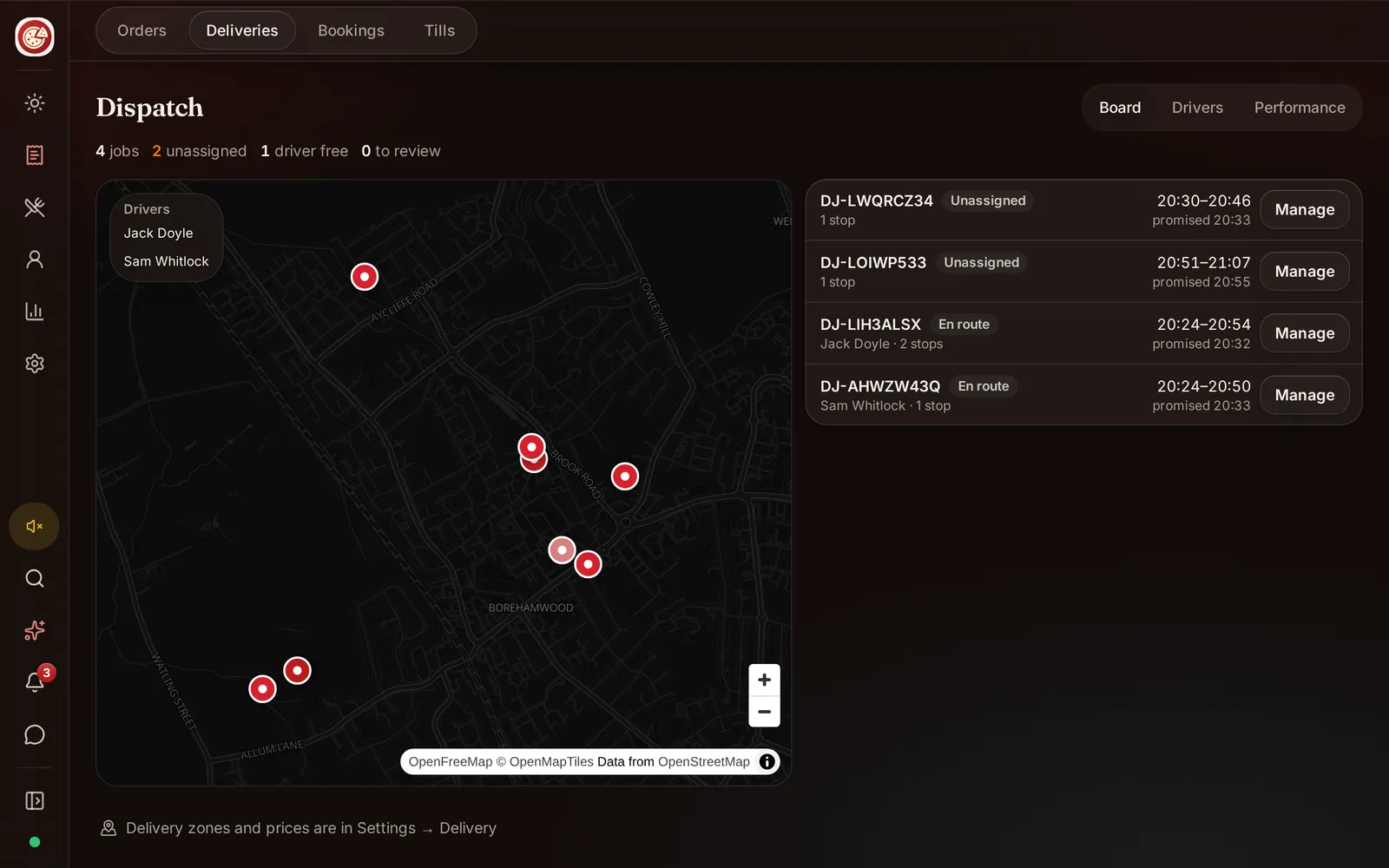
Drive time zones versus radius circles
A radius draws a simple circle around the restaurant. It is easy to understand but ignores rivers, one way streets, motorways, railway crossings and neighbourhood entrances. Two addresses the same straight line distance away can have very different journeys.
A drive time zone follows reachable roads for a chosen travel time. DineHarbor supports drive time delivery zones. The system generates a shape using routing data, which the restaurant should review before use.
Do not assume the shape guarantees an arrival time. Traffic, weather, road works, parking, kitchen delay and driver availability still matter. Treat it as an admission rule for addresses, not a promise that overrides real conditions.
Build zones in layers. Keep the first area tight enough for dependable service. Add an outer area only if food and driver capacity support it. Set a delivery fee and minimum order for each area where appropriate.
Test addresses near every boundary. Include blocks with unusual access and locations separated by a river or major road. Ask a driver to review the map because local knowledge catches routing oddities.
Dispatch board basics
Dispatch connects a prepared order with an available driver. A clear board should show what is waiting, who has it, the destination and the order state. One person should own decisions during a busy service.
The dispatcher needs kitchen information. Sending a driver too early creates waiting and congestion; sending too late leaves food cooling. Agree when an order becomes ready for assignment and how a delay is communicated.
Use a simple operating sequence:
- The kitchen receives and prepares the order.
- The team confirms packing and readiness.
- Dispatch assigns the job to an available driver.
- The driver accepts and collects the correct bag.
- The restaurant and customer can follow progress.
- The driver records completion or reports a problem.
DineHarbor's dispatch logic and driver app support this flow. Watch the driver deliveries guide before training a shift.
Plan exceptions. Decide what happens if no driver accepts, an address is wrong, the guest does not answer, food spills or a vehicle problem occurs. Staff need one escalation route and permission to make a practical decision.
Live tracking for the customer
Tracking reduces uncertainty when it reflects real driver progress. It should show enough for the guest to understand the delivery without exposing unnecessary driver information.
DineHarbor supports live driver tracking. The restaurant should explain location use to drivers, limit access appropriately and set a policy for work devices or personal phones. Tracking should run only as needed for delivery operations.
Test the customer view from dispatch to completion. Check apartment blocks, poor signal areas and a driver returning to the restaurant. If tracking pauses, the page should not make a false claim about an arrival.
Location is personal data. Use it for a clear purpose, retain only what the business needs and restrict who can view it. Get professional privacy advice for your employment and operating model.
Costs and duties to count
Build a weekly cost model with fixed and variable lines. Include paid time before the first delivery and after the last, not only minutes on the road. Add recruitment, uniforms or bags, phone use, vehicle checks and failed deliveries.
Insurance needs particular attention. A normal personal motor policy may not cover food delivery for work. Check the driver's licence, right to work, vehicle, business use and the policies required for your arrangement. GOV.UK explains general responsibilities when using a vehicle for work, but an insurer and qualified adviser should confirm the cover. Last checked: 20 October 2026.
If drivers use bicycles or scooters, create an equivalent safety and maintenance process. Set expectations for weather, breaks, high visibility equipment and safe carrying. Never build a promised delivery time that rewards unsafe travel.
Count payment issues too. Decide whether drivers ever handle cash, how it is recorded and when it is returned. Minimise cash where practical and never ask a driver to carry more than the operation requires.
Set fees from evidence
List the expected weekly delivery cost and the number of completed deliveries. Divide to find an indicative cost per delivery, then review by zone and busy period. This is planning arithmetic, not the final accounting answer.
A flat fee is easy to explain. Zone based fees can reflect longer journeys. Free delivery above a basket value may encourage larger orders, but the margin must still cover the trip. Show the fee and threshold before checkout.
Do not copy a competitor's number without knowing its economics. Your menu margin, driver model and road network are different.
Launch in a controlled area
Start with a few postcodes or a short drive time zone on selected evenings. Train drivers on the Driver app, bag checks, proof of handover, customer contact and incident reporting.
Run test orders to staff addresses without involving a live customer. Check navigation, assignment, tracking, status changes and the restaurant's response to a declined job.
During the pilot, track preparation time, wait before collection, journey time, failed handovers, refunds and guest contacts. Read comments alongside the numbers. A route can look fast while food packaging fails.
Review after every shift for the first week. Change one thing at a time, such as a zone boundary or dispatch handover. Expand only when the kitchen and driver capacity have room.
Own delivery is an operation, not just an app. With a realistic area, clear ownership and respectful driver policies, it can become a dependable direct channel.
Keep emergency contact details and the restaurant number easy for every driver to reach.
Ready to test dispatch with a limited zone? Start the 30 day free trial with no card needed.
Questions and answers
Can drivers use their own phones?
The DineHarbor Driver app runs on supported phones, with an Android download available from the downloads page. Set a clear device and data policy before staff use personal phones.
How should I charge a delivery fee?
Base it on the actual cost and service area, then show it before checkout. Test each zone boundary and explain any minimum order clearly.
Is a drive time zone better than a radius?
Often, because roads and barriers affect a journey more than straight line distance. Review the generated shape and test real addresses before opening it to orders.
See it in DineHarbor
About the author
Editorial team
The DineHarbor team writes this blog for restaurant owners and managers. Every article is checked against the product before it is published, so what we describe is what the software does.
All articles by DineHarbor team