

Start Online Ordering for a Restaurant
How to start online ordering for your restaurant in 7 days, with the real costs of software, card fees and printing, and a test order before you launch.
9 min read

On this page
Key takeaways
- You can start online ordering in 7 days: choose the plan, load the menu, connect payments, set collection and delivery, test, tell customers, then check the numbers.
- The fixed cost can be nothing for up to 30 orders a month, or about 40 pounds, 50 dollars or 45 euros a month for 2,500 orders a month. Card fees come on top.
- Do not launch before you place two real test orders and see each one arrive in the kitchen.
- Prices were checked on the vendors' own pages on 1 November 2026. Rates change, so check again before you pay.
In short: you can start online ordering for your restaurant in seven days. Load your menu, connect a card payment provider, set collection and delivery rules, place two test orders, then tell your customers where to order. The software can cost nothing for a few orders a month or about 40 pounds, 50 dollars or 45 euros a month for 2,500 orders a month on DineHarbor, and you pay a card fee on each payment. The steps below put a cost next to each day.
If you are still deciding whether to leave delivery apps, read commission free online ordering first for the worked example in pounds, dollars and euros. This post is the practical week.
The week at a glance
| Day | Job | Time | Cost |
|---|---|---|---|
| 1 | Choose your plan and create the account | 1 hour | Free trial for 30 days, no card needed |
| 2 | Load the menu, photos and allergens | 3 to 6 hours | Software only; photos from your phone are free |
| 3 | Connect card payments | 1 hour | Provider fees on each payment |
| 4 | Set collection, delivery and opening hours | 1 to 2 hours | Your own driver costs if you deliver |
| 5 | Test orders and kitchen screen | 1 hour | A few pounds of food, or none |
| 6 | Put the link everywhere | 2 hours | Printing: ask a local printer for a quote |
| 7 | Launch and read the first numbers | 30 minutes | Nothing extra |
Day 1: choose a plan and open the account
Decide how many orders you expect. DineHarbor's free Menu plan gives you a website on a free dineharbor.com address and a QR menu, with up to 30 online orders a month. The Restaurant plan gives you your own ordering site and domain with 2,500 online orders a month included, then a small flat fee, and no commission from us, at 40 pounds, 50 dollars or 45 euros a month per location. Both prices come from our pricing page as of 1 November 2026, and plans can change, so read the page before you pay. There is a 30 day free trial with no card needed, which covers your whole first week.
Whatever software you choose, ask three questions before you sign up. Does it take a percentage of each order? Is there a setup fee or a contract? Can you export your menu and customers if you leave? Our comparison of the best online ordering systems shows what to look for.
Cost today: nothing.
Day 2: load the menu
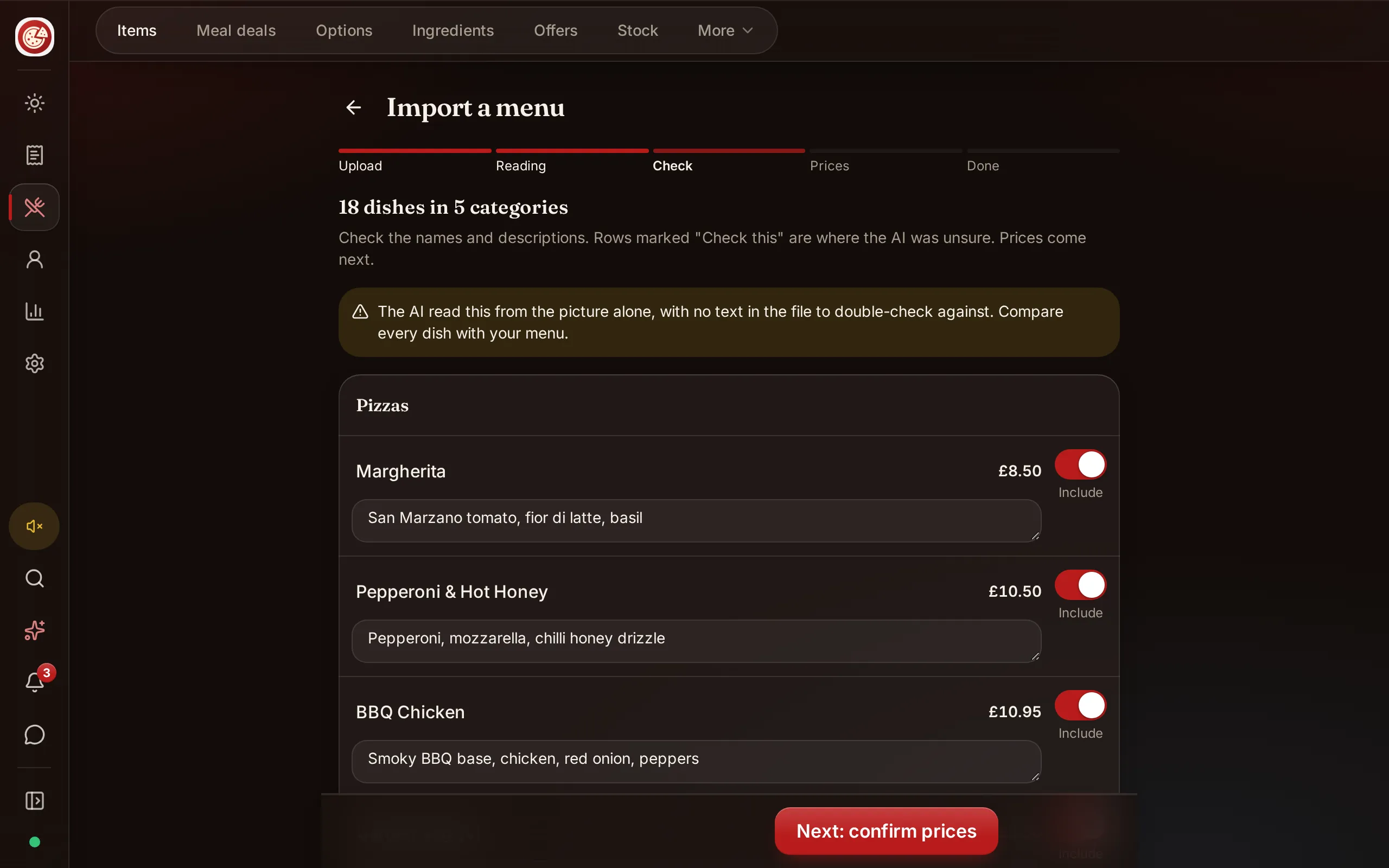
The menu is the longest job and the one customers notice first. If you only have a paper menu or a PDF, use menu import: photograph or upload it and review what comes out. Always check prices and names by hand.
Then do the things that make people order:
- Name dishes the way customers say them, with one short line of description.
- Add a photo to your best sellers. A phone photo in daylight beats a stock picture.
- Set options and extras: sizes, sauces, toppings, with their prices.
- Mark allergens on every dish. This is a legal duty in many countries, so check your own rules. Our guide to allergen information for online ordering explains the basics.
- Hide anything you cannot make reliably in a rush.
If your menu is a paper card, read from paper menu to online menu for a faster routine.

Cost today: your time. Photos from a phone are free.
Day 3: connect card payments
Customers expect to pay by card or wallet when they order. You need a payment provider account in your own name, so that the money goes to you and not through anyone else.
As an example of what providers publish, Stripe's UK page shows 1.5 percent plus 20 pence per standard UK card payment and 2.8 percent plus 20 pence for premium UK cards, and its Ireland page shows 1.5 percent plus 0.25 euro for standard European cards (checked 1 November 2026). We could not read Stripe's US rate on its page, so check it yourself if you are in the United States. Other providers charge differently, so compare two or three. Our guide to card payment fees explains why premium and international cards cost more.
A quick sum shows the size of it. On a 25 pound order at 1.5 percent plus 20 pence, the fee is 0.375 plus 0.20, about 58 pence. On a 30 percent marketplace commission the same order costs 7.50 pounds. That gap is the reason to try direct ordering at all.
You also need identity details for the provider: your business details, bank account and an ID check. Allow a day in case they ask for more.
Cost today: no upfront cost. Fees come out of each payment.
Day 4: set collection, delivery and opening hours
Start with what your kitchen can do well.
- Collection first. It needs no drivers and no delivery zone. Set a preparation time that you can keep, and lengthen it when you are busy.
- Delivery next, if you can. Decide how far you can deliver while food stays hot. Draw a delivery zone, set a delivery fee and a minimum order, and decide who dispatches during service. If you do not have drivers, wait. Our guide to running your own delivery shows the real costs of drivers, fuel and insurance.
- Opening hours and pauses. Set the hours the kitchen is really open, and know how to stop taking orders when you are swamped.
Cost today: nothing for collection. A driver costs wages or per delivery pay, plus insurance and fuel. Count it before you promise free delivery.
Day 5: place test orders
Do not launch until you have placed two real orders yourself: one for collection and one for delivery. Open the site on your own phone, at 360 pixels wide if you have a small one, and go through it like a customer. Pay with a real card, then refund yourself.
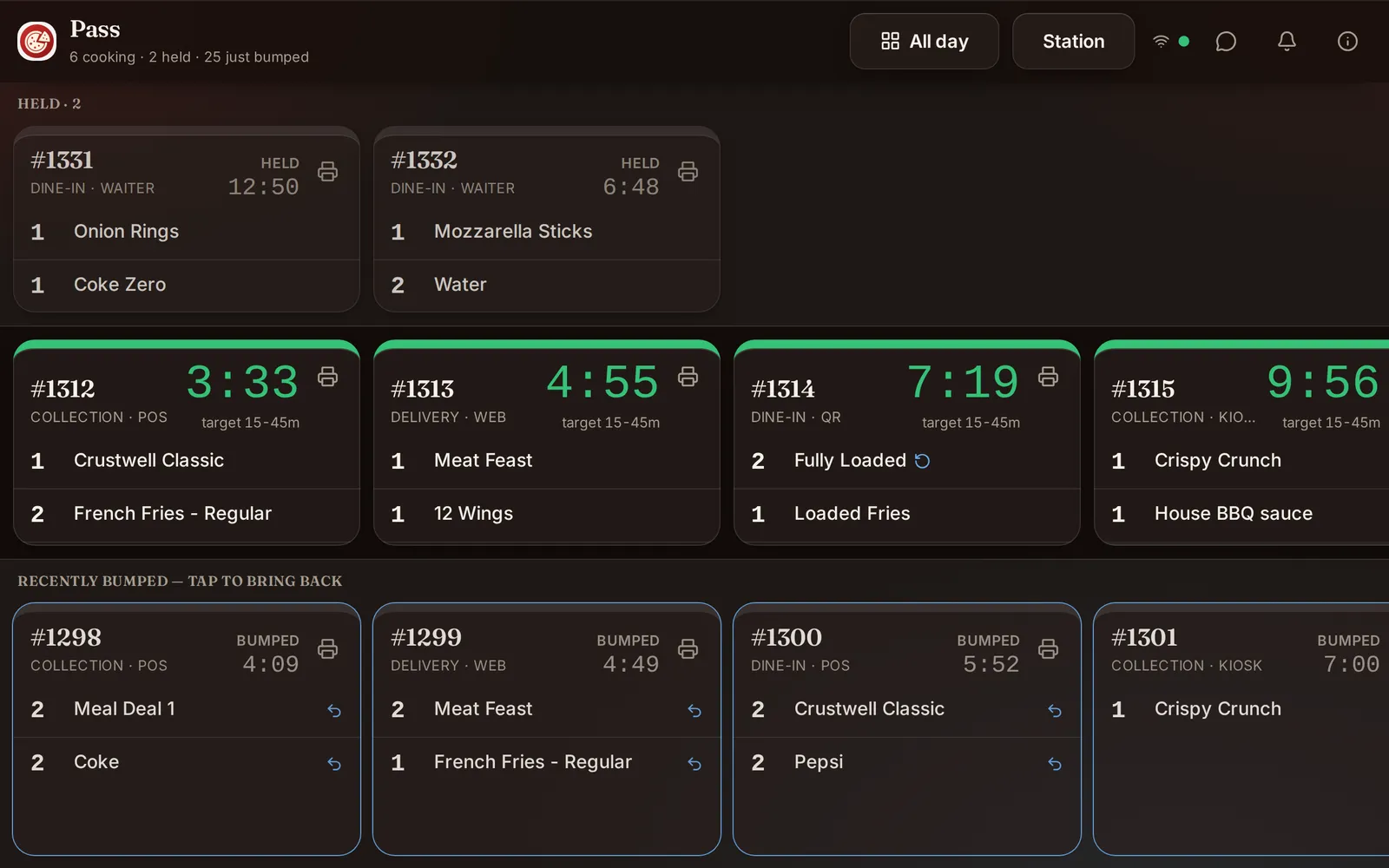
Watch what happens in the kitchen. The order should appear on the kitchen screen or printer within seconds, with the customer name, the time, options and allergens clear.
Ask a friend or a staff member who has never seen it to order without help. Whatever confuses them will confuse customers. Write down every stumble and fix the top three before launch.
Cost today: a few pounds of food you can eat, or a refunded test order.
Day 6: tell customers
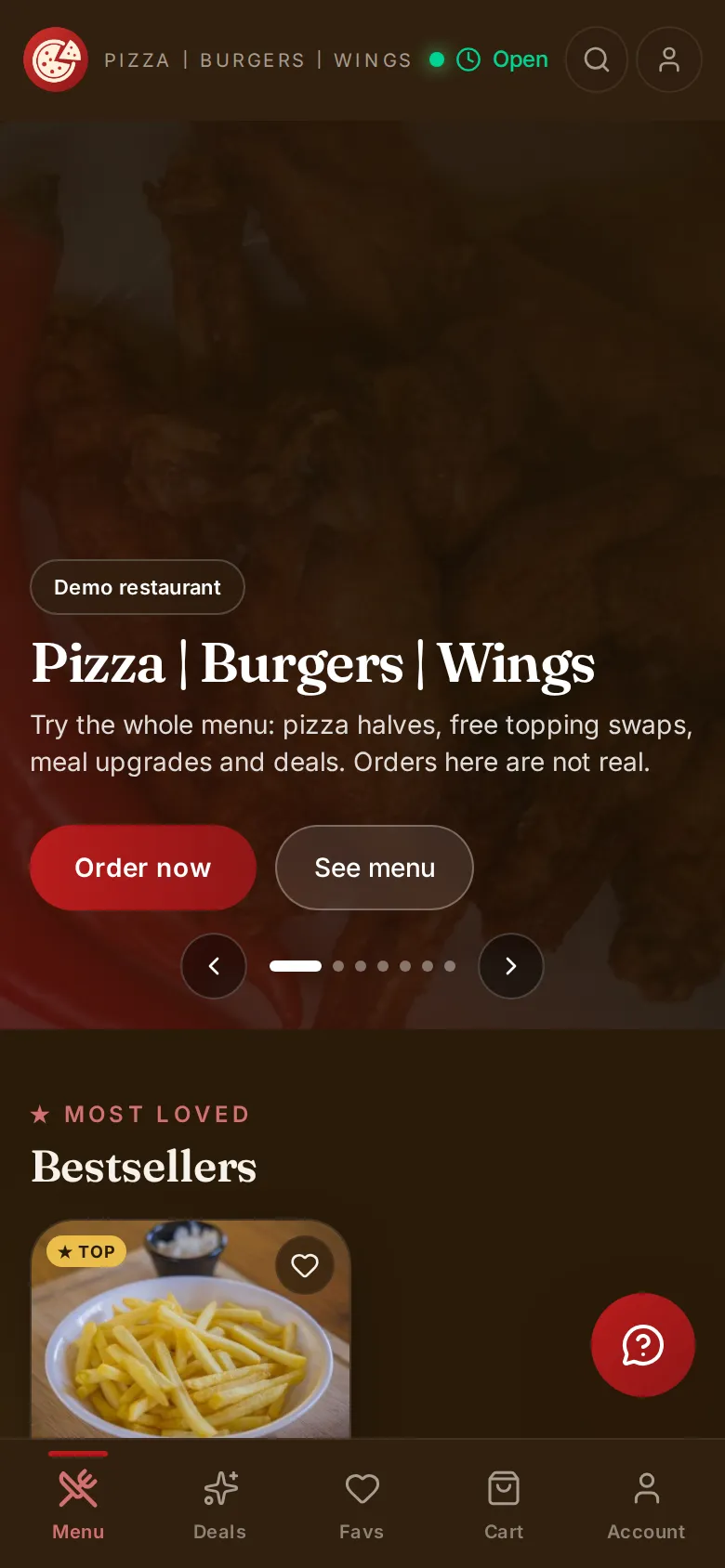
A new ordering site fills only if people know about it. Spend the day on the places hungry customers already look.
- Google profile. Add the ordering link to your Google Business Profile. Our guide to the Google Business Profile for restaurants shows where.
- Your counter and bags. Print a small card with a QR code and a short web address. Ask a local printer for a price; costs vary by quantity and region, so we do not quote one.
- Social pages and website. Pin the link and use the same photos as the menu.
- Regulars. Tell the people who order from you by phone or at the counter. A friendly sentence beats a leaflet.
- One small reason to switch. A modest first order offer or loyalty points is plenty. Our loyalty programme guide shows simple options.
If you also sell through marketplace apps, read their contract before you put your own cards into their bags.
Cost today: printing and a small first order offer, both under your control.
Day 7: launch and read the numbers
Open the site to the public. For the first week, check at the end of each day:
- how many orders came in, and from where,
- the average basket,
- any refused or late orders and why,
- what the kitchen found awkward.
After a month, compare it with your marketplace statements. Take the total you paid in commission and fees, and put it next to your software, card fees, marketing and any extra delivery cost. If the direct route is cheaper per order, put more effort into telling customers. If it is not, find out which line is too large before you decide anything.
What it adds up to
For a restaurant on the Restaurant plan taking 150 direct orders a month at 25 pounds, the running costs are about 40 pounds of software and about 86 pounds of card fees at the Stripe UK standard rate, plus whatever you spend on printing and offers. The same 150 orders at a 30 percent marketplace rate would cost 1,125 pounds in commission. Your rate, basket and card mix will differ, so use your own figures. The commission free ordering article has the full table.
Where DineHarbor fits
DineHarbor gives you the online ordering site, kitchen screens and till in one place, with no commission on orders and a 30 day free trial. See the plans on the pricing page. If you help restaurants get online as an agency, freelancer or consultant, the partners page explains how to refer them and earn a share.
Questions owners ask
Can I do this alone? Yes, if your menu is ready. Allow longer if you have to write descriptions and take photos first.
What if orders arrive during a rush? Stop taking orders for a while, lengthen the preparation time, and add a kitchen screen when volume grows.
What about VAT and tax? Rules differ by country. Check your own, and see our guide on restaurant accounting basics.
Sources and dates
Prices checked on the vendors' own pages on 1 November 2026: Stripe pricing, UK, Stripe pricing, Ireland and DineHarbor's pricing page. Stripe's US rate could not be read, so it is not quoted. Printing and driver costs vary: ask for a quote.
Questions and answers
How long does it take to start online ordering for a restaurant?
A restaurant with a menu ready can be taking real orders in about a week. Most of that time goes into the menu, the test orders and telling customers, not into the software.
How much does it cost to start online ordering?
The software can be free for a small number of orders or about 40 pounds, 50 dollars or 45 euros a month on DineHarbor's Restaurant plan, prices checked 1 November 2026. Add card processing fees on each payment, and any printing or hardware you choose.
Do I need a website first?
No. An ordering site can be your first website. You get an address to share, and you can connect your own domain later.
Do I need new equipment?
Not to begin. A phone or tablet that is on during service can receive orders. A kitchen screen or printer helps once volume grows.
Should I leave delivery apps?
Not at the start. Keep them for new customers while you build your own route for regulars, and compare your numbers after a month.
See it in DineHarbor
About the author
Editorial team
The DineHarbor team writes this blog for restaurant owners and managers. Every article is checked against the product before it is published, so what we describe is what the software does.
All articles by DineHarbor team

