

Restaurant Opening and Closing Checklists
Copy these restaurant opening and closing checklists for kitchen, front of house and managers, with safety checks, cash steps and a daily sign off routine.
6 min read
On this page
Key takeaways
- Checklists turn good habits into routine, so service starts and ends the same way whoever is on shift.
- Keep them short, specific and in the order people actually work, with one named person responsible for each list.
- Include safety, security, cash and system checks, not just cleaning and setting up.
- Review the lists every quarter: remove what nobody does and add what went wrong.
In short: write one opening list and one closing list for each area, put the safety and money checks first, keep each to what really matters, name the person who signs it and review it every few months. Below are lists you can copy and adapt.
About 8 minutes to read. General information. Adapt every item to your premises, equipment and local rules.
The first and last half hours of the day decide how the rest goes. An opening team that finds a warm fridge at 10:30, or a closing team that leaves a back door unlocked, learns the lesson the hard way. A checklist is a cheap way to avoid it.
How to write a useful checklist
- One list per moment and per area: opening kitchen, opening front of house, closing kitchen, closing front of house, manager cash up.
- Put the items in the order people walk the building.
- Use plain verbs: check, turn off, count, lock, record.
- Add the standard: "fridge at or below your limit" rather than "check fridge".
- Name the owner of each list.
- Add a line for exceptions: what went wrong, what was done, who was told.
- Keep each list to one page.
Daily checks also matter for food safety. GOV.UK says that a food safety management system must be based on HACCP principles and that you must keep records of your systems and checks. The Food Standards Agency's Safer Food, Better Business packs use a daily diary for this. See HACCP for restaurants.
Opening checklist: manager
- Disarm the alarm and check that nothing is damaged or missing.
- Walk the building: doors, windows, fire exits clear, lights, fire alarm panel without faults.
- Check the temperatures of fridges and freezers and record them. See temperature logs.
- Read the previous closing notes and the handover.
- Check the rota and who is in. See labour cost and rota.
- Check the day's reservations, large groups and events. See reservations and floor plan.
- Check supplier deliveries due today and what is low or out. See suppliers and ordering.
- Count the float and check the till.
- Brief the team: specials, allergens, 86 items, events, targets.
Opening checklist: kitchen
- Check handwash basins have hot water, soap and paper towels.
- Check fridges, freezers and hot holding equipment, and record temperatures.
- Turn on equipment in the right order and check for faults or gas smells.
- Check probe thermometers and sanitiser strength.
- Set up stations with clean boards, knives and cloths.
- Check date labels, discard anything past its date, and follow first in first out. See FIFO storage.
- Prep to the day's forecast and the par levels.
- Check allergen information for specials and any new dish. See allergens and calories.
- Check pests: signs of droppings, gnawing, flies. See pest control.
- Sign the diary.
Opening checklist: front of house
- Switch on lights, music at a low level, heating or air conditioning.
- Check the floor, the tables, chairs, high chairs and booster seats.
- Check the toilets: clean, stocked, working.
- Set tables with clean cutlery, glasses, menus and condiments.
- Check the till, the card readers, the printers and the kitchen screens are on and connected. See printer setup.
- Test an order from the till to the kitchen.
- Check the online ordering and website show the right hours and available items.
- Update the 86 list.
- Check the allergen file is at the pass and the front of house.
Closing checklist: front of house
- Close or finalise open tables and check every bill is paid.
- Clear and wipe the tables, chairs and menus.
- Sweep, mop and clean the floor.
- Clean and restock the toilets.
- Close out the tills, print the day's report and count the cash. See accounting basics.
- Charge tablets and handhelds.
- Check that no guest items are left.
- Turn off music, signs and non essential lights.
Closing checklist: kitchen
- Cool, label and store prepared food correctly. See cooling food safely.
- Discard anything that has been out too long or is past its date.
- Clean and sanitise all surfaces, equipment, floors and drains. See cleaning schedule.
- Clean the fryer, grill and extraction filters as scheduled.
- Check fridge and freezer doors are closed and temperatures hold.
- Take out waste, recycle and keep bins closed. See reducing food waste.
- Turn off gas and equipment, check the pilot lights.
- Check pest control measures and doors.
- Sign the cleaning schedule.
Closing checklist: manager
- Check both lists are complete and signed, and note exceptions.
- Review the day's sales and tickets. See weekly numbers.
- Do the cash up, record any difference with a reason and bank or secure the cash.
- Record waste and stock changes. See stock control.
- Write the handover note: what broke, what ran out, any guest issue, any staff issue.
- Walk the building, check fire exits are clear, windows and doors locked.
- Set the alarm and lock up. Never leave the building alone if your policy requires a second person.
Use your systems as part of the routine
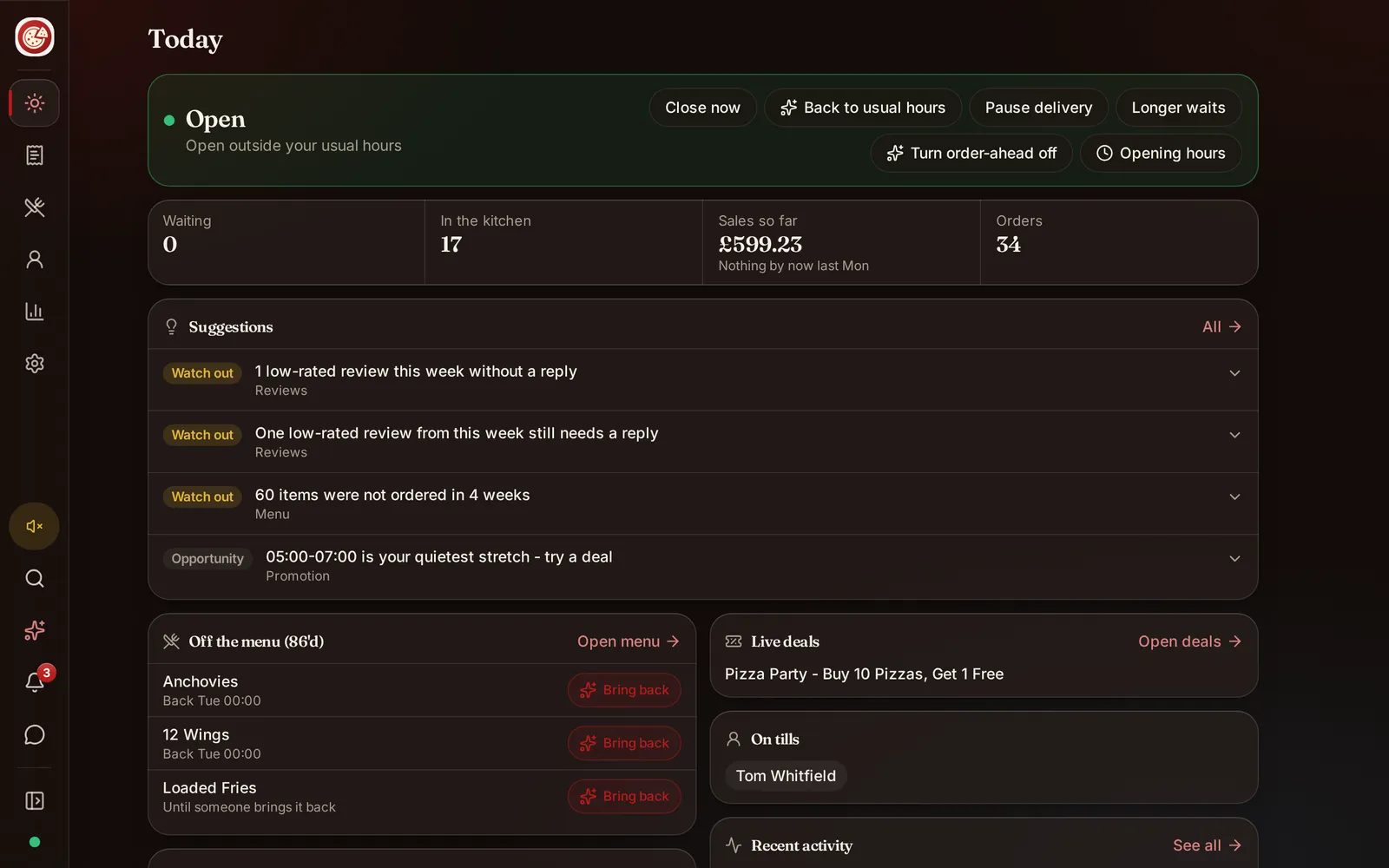
DineHarbor's reports and the Today screen give the manager the day's picture, and the kitchen display and shift tools support the routine; the checks themselves are still done by people. The Today screen shows suggestions each morning from the Growth Advisor, which you can read as part of the opening routine.
Keep records
Sign and date each list, note exceptions and keep the lists with your food safety records for as long as your authority and your insurer require. A signed daily diary is evidence that you checked. See food hygiene inspection.
Review and improve
Every quarter:
- Ask the team which items nobody does.
- Add one line for each problem that happened.
- Remove items that no longer apply.
- Check that every list has an owner.
- Train new staff on the lists. See staff training.
Common mistakes
- Lists so long that they are signed without being done.
- Signing at the end of the week.
- No exception line.
- Lists that do not match the building.
- No one responsible.
A starting point
Copy the lists above, delete what does not apply, add what your building needs and print them on a single page for each area. Use them for two weeks, then trim and improve.
Want a morning overview for your manager? Start the 30 day free trial with no card needed.
Questions and answers
Why use opening and closing checklists?
They make sure nothing important is skipped when people are tired or new, they make handovers clear and they give evidence of the checks you made. Many food safety systems expect daily checks to be recorded.
Who should sign off the checklists?
The person in charge of the shift, such as the opening or closing manager, who confirms each task was done or logged as an exception. A second person can check the closing list.
How long should a checklist be?
As short as it can be while still covering safety, security, cleanliness, readiness and money. If it takes more than 15 to 20 minutes to complete or people skip lines, trim it.
Paper or digital checklists?
Either, as long as people complete them during the task, not at the end of the week. Paper by the door works; a shared digital list can add time stamps and photos.
What do inspectors expect to see?
Inspectors usually look for working systems and records for key checks, such as temperatures, cleaning and any corrective actions. Your own food safety management system says which records you need. Check your authority.
See it in DineHarbor
About the author
Editorial team
The DineHarbor team writes this blog for restaurant owners and managers. Every article is checked against the product before it is published, so what we describe is what the software does.
All articles by DineHarbor team