

Waiting Lists and Walk Ins in a Restaurant
How to manage walk ins and a waiting list: honest wait quotes, balancing bookings and walk ins, seating order, queues, privacy and a script for hosts.
Updated 9 min read
On this page
Key takeaways
- A fair walk in system is simple: take the party size and a contact, quote an honest wait and seat in a clear order.
- Keep a share of tables for walk ins, decide it from your own data and change it by day and daypart.
- An honest wait that is slightly long beats a promise you miss, and a well handled wait often wins the guest.
- Collect only the contact details you need for the wait and delete them when the service ends.
In short: a good walk in routine has four parts: a short greeting, an honest quote, a clear order for seating and a plan for the wait. Hold a small, tested share of tables for walk ins, record the party size and a way to reach each guest, and tell them what is happening.
About 8 minutes to read. General information. Examples use made up numbers.
A couple at the door at 7:30 on a Friday. The room looks full. The host is on the phone. Fifteen seconds later the couple are on the pavement looking for somewhere else. That is lost revenue, and a first impression, in fifteen seconds.
Walk in guests are valuable: they are often locals, they decide on the spot and they can fill gaps that bookings leave. A fair, visible system turns a crowded door into an advantage.
Why a system beats improvising
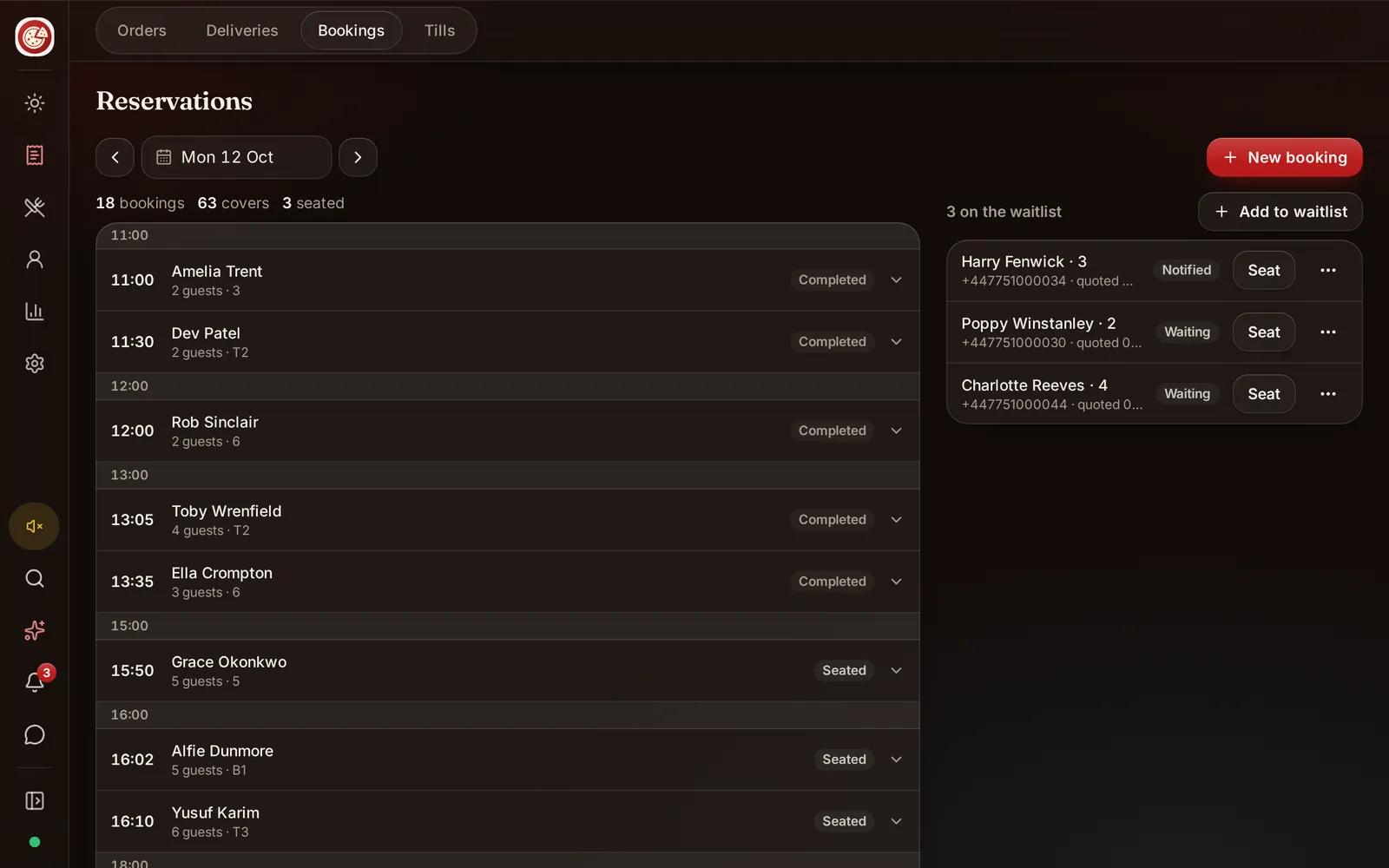
Without a system, three things happen. Guests see others seated before them and feel cheated. Hosts give wait estimates from instinct, and are wrong. Tables sit empty because nobody is sure who comes next. A simple routine fixes all three, and it takes no software to start. If you use a system, DineHarbor includes reservations and a floor plan with a waitlist; see reservations and floor plan for how bookings and walk ins can share one view.
Decide your walk in policy
Write one page that every host can follow.
- Do you take walk ins at all? Many restaurants do, at least at the bar and for small parties.
- How many tables or seats are held for walk ins? Choose by day and daypart. A quiet Tuesday might be open to walk ins; a Saturday at 8pm might hold only the bar.
- How long do you hold a booking before releasing it to walk ins? Common practice is to wait a short, stated time and then release; state your own in the booking confirmation.
- What is the seating order? First come, first served by party size and table fit is the clearest rule.
- What is the maximum quote? If the wait is longer than you can honestly justify, say so and suggest another time.
- Who decides exceptions? One person, usually the manager on duty.
How many tables for walk ins?
Use your own data. For two or three weeks count, for each hour on each day: walk ins who arrived, how many were seated, how many left, how long walk in parties stayed and how many booked tables did not show. See reducing no shows.
Keep the share small at first, release held tables to online booking a set time before the window if they are still free, and review monthly. Seasonal changes, nearby events and weather all move the numbers.
Quote an honest wait
Hosts guess badly because they think about the party in front of them, not the tables behind. A better method:
- Look at the floor. Which tables are at dessert, which at coffee, which have just ordered?
- Estimate when each will free, using your average table time for that party size. Your own numbers matter more than anyone else's.
- Allow for clearing and resetting and for the next booking's time.
- Match the party to a table size. A party of four will not take a two top.
- Add a small buffer. Quote a range, such as "twenty to thirty minutes".
- Offer an alternative: the bar, a different time or a call when a table comes up.
Practise with the team: take five minutes at a quiet moment and have each host guess the next three tables. Compare with what happened.
Capture the waiting list
For a list you need three pieces of information: the guest's name, party size and a way to reach them. Add notes only if they matter for seating, such as a high chair or step free access.
Keep in mind data protection rules. In the UK the ICO describes data minimisation as holding only the data limited to what is necessary for the purpose, and storage limitation as keeping identifiable data for no longer than is necessary. In practice: ask for a phone number only if you will use it to call or message the guest about the table, say so, use it for nothing else and delete it after the service. Check the rules where you operate.
On paper, a simple sheet works: time arrived, name, party size, number, notes, time seated. On a screen, a waitlist shows the same information and lets you move guests onto a table.
Seat in a clear order
- By arrival time, matched to the first suitable table for the party size.
- Skip with a reason. If a party of two arrived after a party of six but a two top is free now, seat the two and tell the six why.
- Release no shows. Call or message once, wait a few minutes and move on.
- Walk ins at the bar are not on the list unless they ask for a table.
- Keep the list visible to all hosts so nobody seats out of order.
The aim is that anyone watching can see that the system is fair.
Make the wait comfortable
A wait is part of the experience, so design it.
- Offer a drink at the bar and a menu to read, so the table order is faster later.
- Give a seat or a place to stand that is out of the way of servers and doors.
- Keep the entrance warm and dry in winter and shaded in summer.
- Tell guests what is happening every ten minutes or so, even if it is "nothing yet".
- Offer to call them and let them walk nearby.
- Be kind to children and people who need to sit. Consider an accessible waiting space. See accessibility in restaurants.
- Do not compensate with free items unless a promise was missed; it teaches the wrong lesson.
Balance walk ins with bookings
The two are partners, not rivals.
- Share the book and the waitlist. The host should see both on the same screen.
- Time bookings to free walk in space. Spread booking times across the evening, and use bookings for the early and late shoulders.
- Use the bar as the walk in buffer. A drink at the bar keeps a guest in the room.
- Release cancelled and no show tables to the waitlist at once.
- Review conflicts: each time a booked party waited because a walk in overstayed, note it. A table time limit or a gentler nudge may be needed.
Table turns and time
Walk ins make table turns more important. Know your typical times by party size, and agree on what service pace is normal. See kitchen ticket times and peak service. If a table has finished and is lingering during a rush, a server can offer coffee or a drink at the bar. Do it gently and never rush a guest who has just sat down.
Phone and online queries
Many guests call to ask "do you have a table?". Prepare a script: "We are taking walk ins from five. We hold a few tables, so it is worth coming early. Or I can book you now." If you use online booking, make sure it shows availability honestly. See reservations and floor plan.
A script for hosts
- Greet within ten seconds, even if you are busy: "Hello, I will be with you in a moment."
- Ask: "How many are you?"
- Quote: "It will be about twenty to thirty minutes. Would you like to wait at the bar or shall I message you?"
- Record: name, party size and contact.
- Update: "Still about ten minutes."
- Seat: "Your table is ready, please follow me."
- If you cannot seat them: "I am sorry, we are full tonight. We have space tomorrow at six. May I book that for you?"
Review the results
Once a month check: how many walk ins you saw, how many you seated, how many left before being seated and the average wait. If many leave, look at quotes, the comfort of the waiting area and your held share. Compare with sales per available seat hour.
Common mistakes
- Quoting a wait without looking at the floor.
- Letting different hosts apply different rules.
- Taking phone numbers and keeping them forever.
- Letting the list live in one person's head.
- Holding too many tables empty for walk ins who never come.
- Treating walk ins and bookings as separate worlds.
- Not telling waiting guests what is happening.
A checklist
- Write a one page walk in policy.
- Hold a small tested share of tables.
- Record name, party size and contact only.
- Quote from the floor, with a buffer.
- Seat in a clear, visible order.
- Make the wait comfortable and keep guests informed.
- Delete contact details after service.
- Review the numbers every month.
Sources
- ICO, A guide to the data protection principles (data minimisation and storage limitation), read in October 2026.
- Your national data protection authority for the rules where you operate.
Want bookings and the waitlist on one screen? Start the 30 day free trial with no card needed.
Questions and answers
How do I decide how many tables to hold for walk ins?
Look at your own history: how many walk ins arrive per hour on each day and how long they stay. Start with a small share, test for a few weeks and adjust by day and time. Do not copy another restaurant's number.
How accurate should a quoted wait be?
Base it on the tables that will actually free up, then add a small buffer. It is better to quote slightly long and seat early than the other way round.
Should I take phone numbers for a waiting list?
Only if you need them to tell the guest their table is ready. Explain what you will do with the number, use it only for that purpose and delete it after service. Data protection rules apply in many countries.
What do I do about guests who leave without telling me?
Call or message once, then release the table and note it. Look at the pattern: if many leave, your quotes may be too long or your space too uncomfortable.
Should walk ins pay a deposit?
No. A deposit is for bookings. DineHarbor does not collect deposits, so any deposit you take is handled outside the product.
See it in DineHarbor
About the author
Editorial team
The DineHarbor team writes this blog for restaurant owners and managers. Every article is checked against the product before it is published, so what we describe is what the software does.
All articles by DineHarbor team