

Build a Restaurant Website That Takes Orders
Build a fast restaurant ordering website with a clear menu, own domain, collection and delivery choices, food details and a simple direct route from Google.
Updated 7 min read
On this page
In short: a restaurant ordering website should help a guest choose food and complete an order quickly on a phone. It needs a current menu, clear collection and delivery choices, accurate allergens, visible opening information and a direct link from the places where customers find the restaurant.
DineHarbor includes a restaurant online ordering site on every public plan. It supports an own domain or a free DineHarbor address and takes no commission on orders.
Start with the mobile order
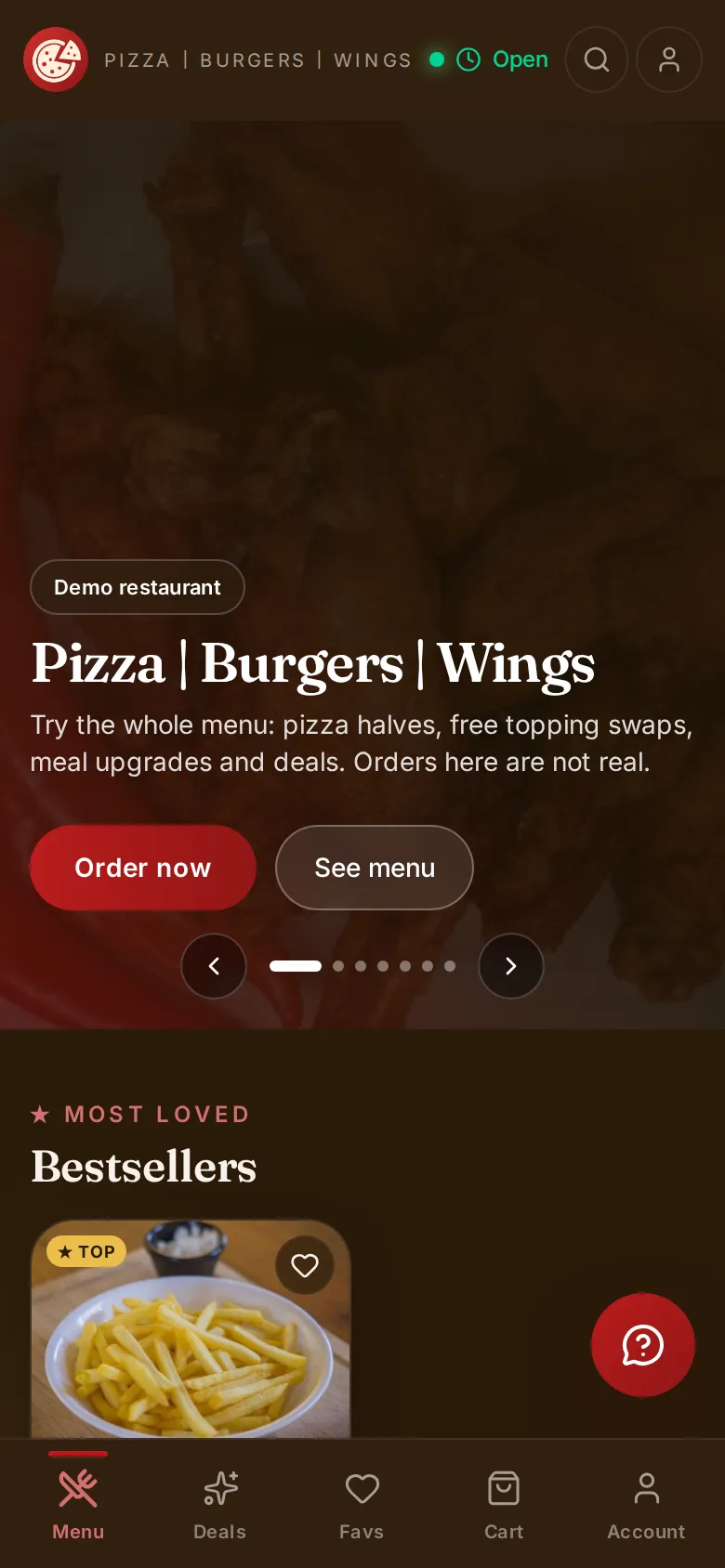
Most important decisions happen on a small screen: is the restaurant open, does it deliver here, how long will collection take, and can the guest find a dish? Test the whole flow at 360 pixels wide before polishing a desktop home page.
The first useful screen should identify the restaurant, location and service status. Put ordering near the top. Do not make a hungry guest pass through an animation, account wall or marketing story before seeing the menu.
Use short categories and readable product names. Let names wrap rather than squeezing them beside a price. Put the description and food details on a second row. Make buttons large enough for touch and keep basket access visible.
Speed matters because each extra image and script delays the menu. Compress photos, load media only when needed and reserve image space so content does not jump while loading. A fast text menu is better than a beautiful page that stalls on mobile data.
Use honest photos and clear food details
Show real dishes where possible. A photo should represent the portion and presentation a guest will receive. Do not borrow images or use a stock image that implies ingredients the dish does not contain.
Descriptions should answer practical questions: main ingredients, cooking style, serving size where helpful and notable heat. Avoid strings of praise that say nothing about the food.
Show prices before the basket. When an option costs extra, display the added amount beside it. Required choices, maximum selections and unavailable items should be obvious.
DineHarbor supports calories and allergen fields. Accurate allergen information must come from recipes and supplier details, not a generated description. UK restaurants can use our online allergen guide to build a safer process.
Use your own domain
An own domain gives guests a memorable route back to the restaurant. Keep it short and close to the trading name. Use a secure connection and renew the domain well before expiry.
Make one person or company account the clear owner. Record the registrar, renewal date and recovery method somewhere the business controls. A web designer should not be the only person able to renew the restaurant's address.
Every DineHarbor plan can use the restaurant's own domain or a free name.dineharbor.com address. Check that both the public site and checkout stay under a route guests can recognise.
Set one preferred address and redirect alternatives consistently. That helps guests and search engines avoid duplicate versions. Do not print a temporary address on permanent packaging before the domain is tested.
Make collection and delivery distinct
Ask the guest to choose collection or delivery at a useful point. Show service hours, estimated timing and any minimum or fee before the final payment step.
For collection, tell people where to go and how the order will be identified. Include the branch address and avoid using only a map pin. If curbside or a separate collection counter is not actually offered, do not display it.
For delivery, validate the address against the restaurant's real service area. DineHarbor supports delivery zones, including drive time zones, and a driver app with live tracking on eligible plans. Explain the fee and do not turn the generated drive time into a guaranteed arrival.
Run two test orders after every major menu or settings change. Choose an address well inside a zone and one just outside it. Check the message for both.
Connect the kitchen
An online site is not complete when payment succeeds. The order must arrive in the correct operational queue with items, options, source, service type, customer details and timing intact.
Send test orders to every preparation station. Include a product with modifiers, a deal, an allergy note and an unavailable item. Confirm what happens if the restaurant cannot accept an order.
DineHarbor routes ordering site orders into the restaurant system, including kitchen displays and printers. Watch the online ordering guide for setup and the customer ordering guide to see the guest route.
Train staff to recognise a paid online order and a payment still awaiting confirmation. Never ask the kitchen to infer payment state from a printed name.
Link from Google and other profiles
People often find a restaurant through search or maps before visiting its site. Keep the website, phone, address and opening hours consistent on the restaurant's Google Business Profile and other public listings.
Google provides official Business Profile help for editing details and links. Follow its current rules and verify the profile through the business. Last checked: 20 October 2026.
Link to the restaurant's real ordering page, not a generic home page that requires another search. Use descriptive button text such as Order for collection rather than a vague Learn more.
Do not claim rankings or traffic from a profile change without evidence. Use analytics and order source records to see what happens over time.
Earn trust at checkout
Show the restaurant identity, branch, basket, service type, time, fees and total before payment. Make editing easy. A guest who chose collection by mistake should not need to empty the basket to correct it.
Ask only for information needed to fulfil the order and chosen account features. Explain marketing choices separately. Publish contact, privacy, refund and relevant food information in plain language.
Give a clear confirmation with an order number and next step. Send notifications only through channels the guest expects and the restaurant has configured. Never show success while payment status is unknown.
Maintain the website every week
Assign owners for menu, hours, delivery settings and technical checks. Before a bank holiday or seasonal change, confirm hours on the site and external profiles.
Each week, place a small test order or use an approved test path. Check the phone view, one payment route, kitchen arrival and confirmation. Review failed orders and searches that returned no useful item.
Each month, remove old notices, review top dishes and confirm contact links. A site feels abandoned when last season's banner is still above today's menu.
Measure completed orders, failed checkouts, refunds, repeat customers and preparation outcomes. Page visits alone do not show whether the operation works.
A simple launch checklist
Check the domain, mobile speed, menu structure, prices, options, allergens, collection route, delivery zones, payment, kitchen ticket and confirmation. Ask a person outside the setup team to place an order without guidance.
Keep the old ordering route available until the new one passes a real service. Put the new address on receipts, menus and profiles only after the team can support it.
A useful restaurant website is not a brochure with an order button added. It is part of service, from discovery to kitchen handover.
Ready to test your menu on an own ordering site? Start the 30 day free trial with no card needed.
Questions and answers
Do I need a separate app for online ordering?
No. A mobile friendly browser ordering site lets guests order without installing an app.
Can I use my own domain with DineHarbor?
Yes. Every plan supports the restaurant's own domain or a free name.dineharbor.com address.
Does DineHarbor charge commission on website orders?
No. DineHarbor takes no commission on orders, while the restaurant's chosen payment provider may charge card fees.
See it in DineHarbor
About the author
Editorial team
The DineHarbor team writes this blog for restaurant owners and managers. Every article is checked against the product before it is published, so what we describe is what the software does.
All articles by DineHarbor team