

Best Restaurant Inventory Management Software
The best restaurant inventory management software compared on prices checked in November 2026, with a worked food cost example and honest limits for each tool.
Updated 6 min read

On this page
Key takeaways
- Inventory software runs from stock counts inside a POS to specialist tools with recipe costing, ordering and supplier links.
- MarketMan lists Starter at $249, Growth at $299 and Enterprise from $449 a month; Apicbase publishes no prices and bills annually by quote.
- Start with the problem (food cost drift, waste, late ordering or several sites) and choose the lightest tool that fixes it.
- No software helps unless someone counts the stock on a schedule.
In short: the best restaurant inventory management software is the lightest tool that fixes your actual problem. A POS with stock built in may be enough. A specialist tool adds recipe costing from supplier invoices, ordering and variance reports, at a higher price. Vendor prices below were checked on each vendor's own page in November 2026, and anything we could not read is marked "check on their site".
Decide the problem first
Most owners who search for inventory software have one of four problems.
- Food cost is higher than the recipes say. You need counts and a comparison of what you should have used with what you did use.
- You waste a lot. You need a waste log with reasons, and par levels so you stop over buying.
- You order late or too much. You need ordering by par level or by recipe, and supplier pack sizes.
- You run several kitchens. You need transfers between sites and one view of stock value.
Our stock control guide shows the weekly routine, and recipe costing shows how ingredient prices turn into dish margins. If you only need to know what to fix first, read food cost percentage.
Restaurant inventory software compared
Prices checked November 2026 on each vendor's own page unless stated.
| Tool | What it publishes | Built for |
|---|---|---|
| MarketMan | Starter $249, Growth $299, Enterprise from $449 a month; recipe costing, actual against theoretical, waste (MarketMan) | Independents and chains that want a specialist tool |
| Apicbase | No amounts, quote only; billed annually, monthly billing adds 15%; Growth starts at 5 outlets (Apicbase) | Multi site groups with menu engineering and procurement needs |
| Restaurant365 | Check on their site; we did not read a published price | Operators who want accounting, inventory and payroll in one system |
| Lightspeed Restaurant | Inventory listed on higher plans; check on their site (compare) | Restaurants already on Lightspeed |
| Square for Restaurants | Check on their site for what stock features each plan includes | Small venues already on Square |
| DineHarbor | Stock control in the Manager app; paid packages run from Restaurant £40 to Full service £70 a month per location (pricing) | Restaurants that want stock beside the till and the menu |
Currency matters: MarketMan's page uses a dollar sign without naming the currency, and DineHarbor prices in pounds, so convert at today's rate before comparing.
MarketMan
MarketMan's page lists real time recipe costing, actual against theoretical reporting, waste management and one supplier integration on Starter, smart ordering and a second integration on Growth, and email invoice scanning, advanced reports, unlimited integrations and API access on Enterprise. API access is an add on from $25 a month for one to three locations, and a commissary tool is priced separately. It is a serious specialist tool, and its price reflects that. The page does not state contract length, so ask.
Apicbase
Apicbase is built for groups. Its plans are Growth (starting from 5 outlets), Professional and Enterprise, all by quote, with quantity discounts as locations rise. Its page lists menu engineering, procurement, inventory management and sales analytics. A single restaurant will probably find it more than it needs, but a multi site group that wants central purchasing may find it fits well.
Restaurant365, Lightspeed and Square
Restaurant365 combines inventory with accounting and is aimed at larger operators; check on their site for what a single restaurant pays. Lightspeed lists inventory on its higher plans, and Square offers stock features that vary by plan. For all three, the useful test is the same: load ten real ingredients, run a count and see how long it takes.
DineHarbor stock control
DineHarbor's Stock screen, under Menu in the Manager, lists ingredients with their unit, on hand quantity, par level and value, and counts the lines below reorder level. Around it:
- Suppliers and orders: suppliers with their products and pack sizes that convert to your units, purchase orders, and part receiving when only some of an order arrives.
- Blind counts: counters do not see the expected figure until they have counted, then you review the variance.
- Waste with reasons: each waste entry carries a reason code, so you can see where food goes.
- Transfers: move stock between locations, with an append only history of every movement.
- Menu link: ingredients are linked to dishes, and allergens are held on ingredients. When an ingredient runs out you can switch off the dishes that need it. The Manager previews which dishes will change and explains why each is unavailable. The same availability override works on a product, a variant, a modifier option or an ingredient.
- Theoretical against actual: the reports compare what sales say you used with what a count shows.
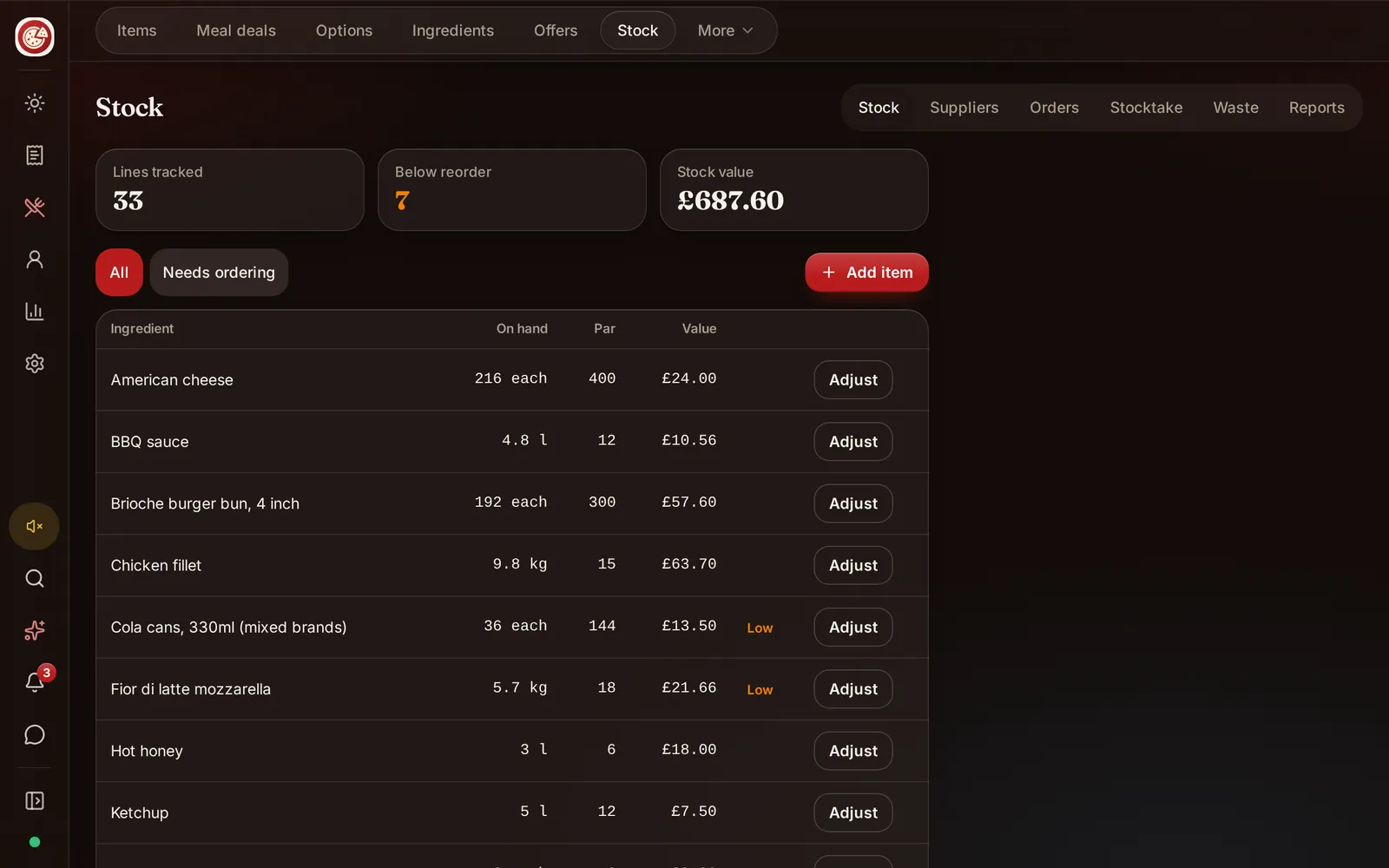
Honest limits: DineHarbor is not a specialist procurement tool. Its feature page does not list invoice scanning or supplier integrations, so if you want invoices read automatically, MarketMan or Apicbase is the closer fit. Details are on the inventory and stock control page, and stock is part of the Manager on every plan.
What to look for
- Can it cost recipes from supplier prices, and update when prices change?
- Does it compare counted stock with what the till says you sold?
- Can it handle transfers between sites and pack sizes from suppliers?
- Who does the data entry, and how long does a count take?
- What does a second location cost, and what happens if you cancel? Can you export your data?
A worked example: finding a food cost gap
Take one week with sales of 10,000 and the same numbers in pounds, dollars or euros (the percentages do not change with the currency).
| Line | £ | $ | € |
|---|---|---|---|
| Opening stock | 2,000 | 2,000 | 2,000 |
| Purchases in the week | 3,200 | 3,200 | 3,200 |
| Closing stock (counted) | 1,800 | 1,800 | 1,800 |
| Food used | 3,400 | 3,400 | 3,400 |
| Actual food cost | 34% | 34% | 34% |
Opening stock plus purchases minus closing stock gives food used: 2,000 + 3,200 − 1,800 = 3,400, which is 34% of 10,000. If your recipes say the dishes sold should have cost 30%, the gap is four points, or 400 a week. Over a year that is about 20,800 in whichever currency you trade in. The gap comes from waste, over portioning, theft, price rises or counting mistakes, and software only finds it if the counts are honest. See reducing food waste and suppliers and ordering for how to close it.
How to choose
- One site, a POS already in place: try the stock tool in your POS first.
- Several sites, central purchasing, menu engineering: price a specialist tool and ask for a quote.
- Unsure: run a four week trial with ten ingredients and compare your actual food cost with the theoretical one.
See DineHarbor pricing for what is included on each plan, or try the demo below.
Questions and answers
What is the best restaurant inventory management software?
There is no single best. A specialist tool such as MarketMan or Apicbase suits recipe costing, supplier ordering and several kitchens. A POS with stock built in, such as DineHarbor, suits a restaurant that wants counts and waste beside the till. Choose by your problem and price it on your own locations.
Do I need inventory software?
If your food cost drifts and you do not know why, or you run several kitchens, it helps. A very small kitchen may manage with a weekly count in a spreadsheet.
How much does MarketMan cost?
Its pricing page lists Starter at $249, Growth at $299 and Enterprise from $449, checked November 2026, with a dollar sign and no named currency. Add ons are priced separately. Check the page for current terms.
Is Apicbase quote only?
Its page shows no amounts, only a team contact, with annual billing by credit card and a 15% fee for monthly billing, checked November 2026.
Does my POS include inventory?
Some do. Lightspeed lists inventory on higher plans and DineHarbor includes stock control on every plan. Check the depth with your own ingredient list before relying on it.
How often should I count stock?
Weekly for the full list is a common rhythm, with a quick count of the ten most expensive items more often. The best schedule is the one your team keeps.
See it in DineHarbor
About the author
Editorial team
The DineHarbor team writes this blog for restaurant owners and managers. Every article is checked against the product before it is published, so what we describe is what the software does.
All articles by DineHarbor team

